

When the Website Runs Out of Seats

By Titanium in Home Server Projects
· 33 views
When the Website Runs Out of Seats: Diagnosing a Slow Site Like a Sick Diesel
Tonight the site went down on me. Anyone who has chased a Cummins that "runs fine, then doesn't" knows the feeling. Everything looked healthy, but something was wrong.
How I Caught It: The Dash Gauges
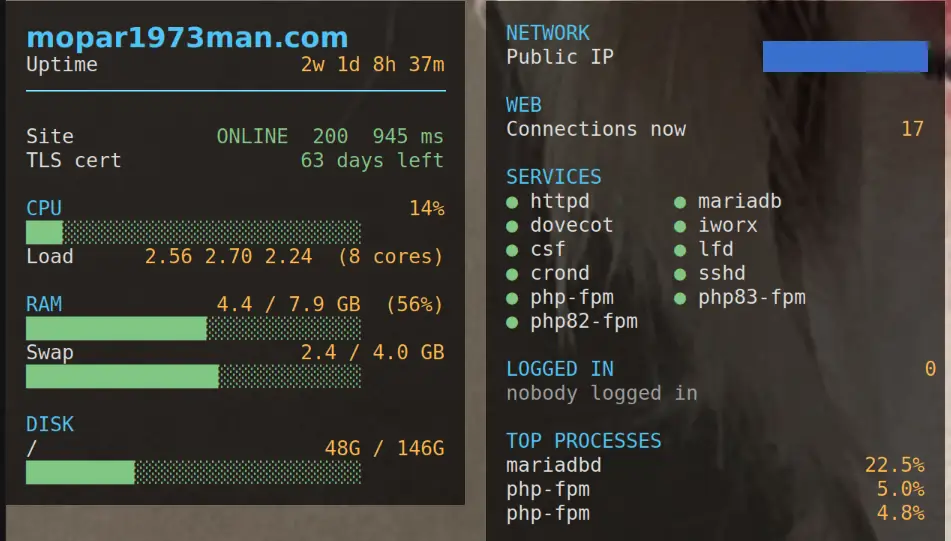
I didn't find out because a member emailed me. I found out because of the gauges. I run Linux on my desktop, and I use a little monitoring panel called Conky that sits right on my screen and shows the health of the website server around the clock: CPU load, memory, swap, disk, uptime, whether the site is answering, even how many days are left on the security certificate. It's the same idea as a dash full of gauges in a truck. You don't have to go looking for trouble, because the needle moves before the engine quits.
Tonight the panel showed the site flip to DOWN, and a quick look at the load told me the server was struggling to keep up. That early warning is the reason I was already digging in before it turned into a long outage. If you run your own site, I can't recommend a simple monitor like this enough.
The Symptoms
Load on the server spiked to 17 on an 8-core machine, but the CPU was only about 20% busy. That's like a truck with the tach pegged and no power at the wheels. Then the site stopped answering.
Ruling Things Out, One at a Time
Like any diesel diagnosis, I worked down the list:
Bot flood? A crawler was hitting hard, but its traffic was steady all day and silent during the spike. Not guilty.
Disk or memory? No disk waiting, and swap wasn't thrashing. Not guilty.
Mail server? Quiet. Not guilty.
DNS or SSL settings? Both checked out clean.
The Clue
Timing a single page request showed the connection opened instantly, then sat for 4 to 8 seconds before the secure handshake finished, and the page came right back after that. That's a queue problem, not a power problem. Something was making visitors wait in line.
The Answer
The Apache error log had been shouting about it the whole time: "scoreboard is full, not at MaxRequestWorkers. Increase ServerLimit." Apache keeps a fixed number of seats for worker processes, and mine was set to 8. When a burst of visitors and bots filled every seat, new connections were accepted but had to stand in the aisle until someone left. The log showed it had been creeping up all week, and it got bad today.
The Fix
I doubled the seating, from 8 to 16 worker processes and from 200 to 400 total connections. One gotcha: Apache ignores a change like this on a gentle reload, so it takes a full restart. My restart hung for 90 seconds because the old Apache wouldn't shut down, so I also shortened the stop timeout to 20 seconds so it can't hang that long again.
The Lesson
High load with low CPU means something is waiting, not working. Don't guess. Check one thing at a time, and read the logs, because the answer was sitting in the error log the whole time. And keep a gauge where you can see it, because the earlier you catch a problem, the cheaper it is to fix.
Edited by Titanium
Recommended Comments