Hello moparman1973 and the community at large, excited to make my first post. Quick background on me - engineering background, had some WRX's which I loved (totaled both, lol) and always wanted a diesel, never thought I'd be able to friggin' afford one. I ended up getting from my buddy a 1999 Ram 2500 RWD / NV4500 5-Speed Manual, Extended cab & 9 ft bed, ~313k miles, for $500! Which he was happy to do - he bought this truck from the original owner in FL, that guy used it as his daily marine mechanic/repair rig for years and to tow a 5th wheel trailer to Alaska and back to FL every year for the first 12 years he owned it. My buddy got it near the start of college in 2017 around 270k miles, and by 2024/312k miles it needed a new clutch so we put the cheapest ebay clutch and flywheel we could find on there at my place. Took all day, got soaked in the oil that has kept the entire vehicle rust free for the past 26 years, it was a true bonding moment for a couple bros. Then a week later, on his way back from work, the KDP hits! Ah! Oil everywhere! Unfortunately he lives in an apartment so no easy way to fix it, just got out of college so no money to take it to a shop, so he was ready to take it to a junkyard. I told him he'd probably get $500, he agreed, I offered it to him and he was happy to get his money back on the cheap clutch. His fiancé was happy too (my wife not so much, but she has come around in that she is glad I have something I think is kewl).
Anyway, I've had to repair basically everything on this truck and this community has helped me out a friggin' ton. So I figured I wanted to give back. I'll start with this fix for the overhead computer - my issue is that it would not save any changes, it would reboot to the same state every startup. The guy I got it from said it had been like that at least since 2017 when he bought the truck.
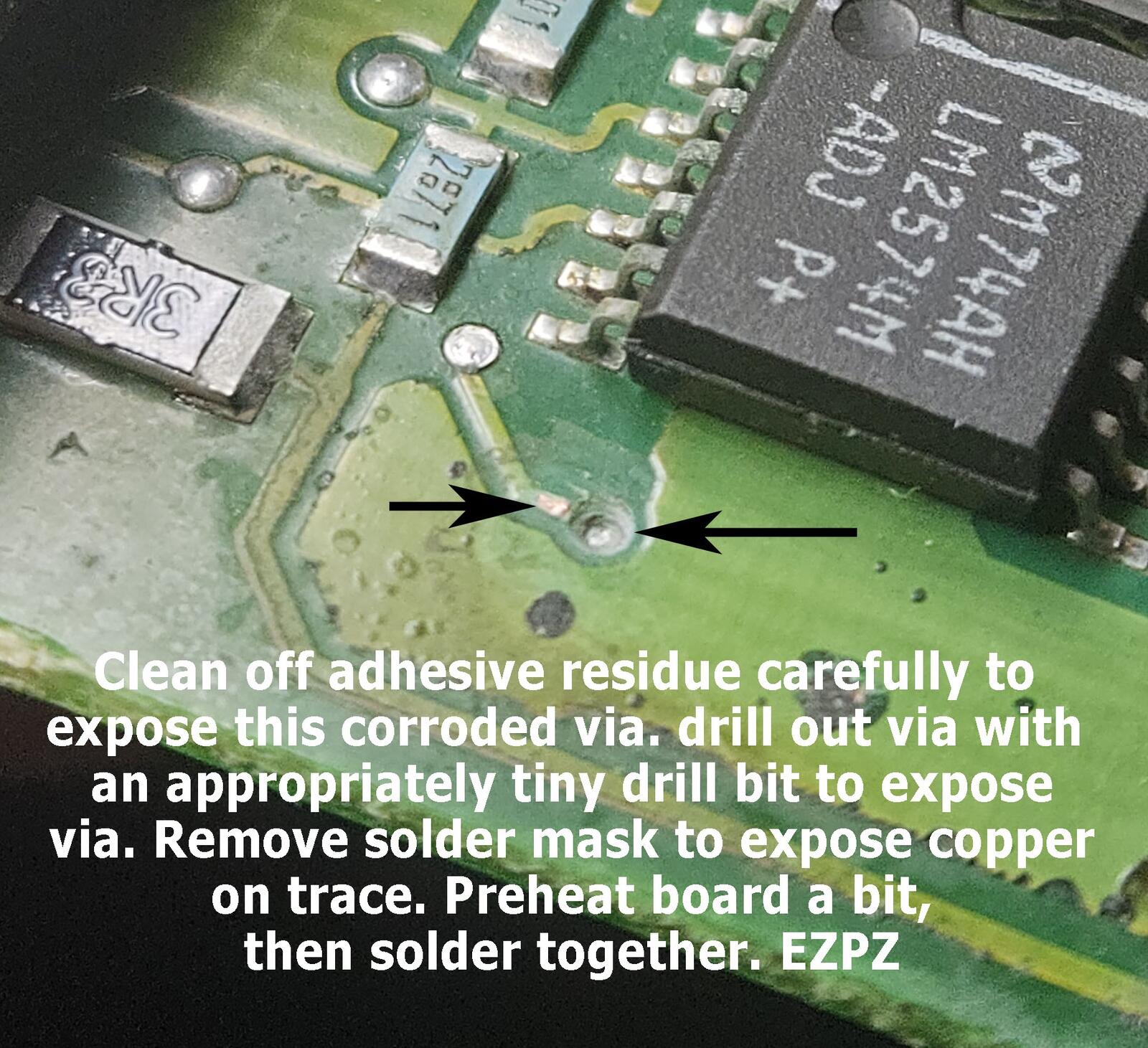
Well if you open up one of these overhead display computers up you probably have seen the orange "SURGE" labeled capacitor to the bottom right of the display module board looking terrible, with the glue that originally held it looking worse. Well the capacitor is an easy replacement for anyone with a few hours of solder experience, but that alone doesn't fix it. In this case, the glue had corroded a through-board via that was used for the key-off sense --> save state to EEPROM circuit. I was able to fix it by simple drilling out the top side corrosion of the via, scraping the green soldermask coating off the trace going to it, and just soldering them together.
In order to track down this fault I went as far as removing the display and desoldering the EEPROM chip to test it. I have that .BIN file if anybody wants it, but it doesn't seem very useful honestly. However you can probably pull a read off the EEPROM on this overhead computer without removing the display, there are via's off the EEPROM that are really only there for access from the backside. I've taken lots of good pictures of this board and uploaded them to a public github repo here if anyone wants to see them: https://github.com/dhef2543/2G-2nd-Gen-Dodge-Ram-Overhead-Trip-Display-Computer-Documentation/tree/main
Hopefully someone benefits from this! Thanks for reading my post. If you're still reading, I've also got a spare (told it was broken so I broke it more) ECM with this truck that I have been reverse engineering in Ghidra, and hardware reverse engineering / documentation via KiCad - already figured out a bunch of neat stuff, how DTCs are thrown and handled, how the fuel tables are handled, how the VP44 CAN messages are built and interpreted, how to remove 3200 RPM limiter. Haven't tried the RPM limiter on my truck yet (333k mile stock springs lol) but I have seen others doing it online and pushing some VP44's to 4000 RPM, nothing other than ECM flashing. Some VP44's only hit 3500-3800 but they all fall pretty flat up top anyway from what I've seen on those posts. That ECM reverse engineering repo is still a bit disorganized and incomplete, I'd like to share it here once I get a bit more done and prep for a public repo. My ultimate goal there (if I see it through) is to design a totally compliant drop-in aftermarket ECM that works fine with the regular DRBIII scan tools and such.
Another cracked up project I have brewing in my head is a custom P7100 / p-pump with electronic timing, that could drop right in with our ECMs (or custom tuners, aftermarket ECMs, etc.). Machining a custom P7100 body wouldn't be cheap, but I can't help but think it would be sooo sick to have the super quick cold starts and overall better mpg of the vp44 and the 4-5k rpm range of the p-pump. Has anyone tried? Anyone interested in such a thing?


Hello moparman1973 and the community at large, excited to make my first post. Quick background on me - engineering background, had some WRX's which I loved (totaled both, lol) and always wanted a diesel, never thought I'd be able to friggin' afford one. I ended up getting from my buddy a 1999 Ram 2500 RWD / NV4500 5-Speed Manual, Extended cab & 9 ft bed, ~313k miles, for $500! Which he was happy to do - he bought this truck from the original owner in FL, that guy used it as his daily marine mechanic/repair rig for years and to tow a 5th wheel trailer to Alaska and back to FL every year for the first 12 years he owned it. My buddy got it near the start of college in 2017 around 270k miles, and by 2024/312k miles it needed a new clutch so we put the cheapest ebay clutch and flywheel we could find on there at my place. Took all day, got soaked in the oil that has kept the entire vehicle rust free for the past 26 years, it was a true bonding moment for a couple bros. Then a week later, on his way back from work, the KDP hits! Ah! Oil everywhere! Unfortunately he lives in an apartment so no easy way to fix it, just got out of college so no money to take it to a shop, so he was ready to take it to a junkyard. I told him he'd probably get $500, he agreed, I offered it to him and he was happy to get his money back on the cheap clutch. His fiancé was happy too (my wife not so much, but she has come around in that she is glad I have something I think is kewl).
Anyway, I've had to repair basically everything on this truck and this community has helped me out a friggin' ton. So I figured I wanted to give back. I'll start with this fix for the overhead computer - my issue is that it would not save any changes, it would reboot to the same state every startup. The guy I got it from said it had been like that at least since 2017 when he bought the truck.
Well if you open up one of these overhead display computers up you probably have seen the orange "SURGE" labeled capacitor to the bottom right of the display module board looking terrible, with the glue that originally held it looking worse. Well the capacitor is an easy replacement for anyone with a few hours of solder experience, but that alone doesn't fix it. In this case, the glue had corroded a through-board via that was used for the key-off sense --> save state to EEPROM circuit. I was able to fix it by simple drilling out the top side corrosion of the via, scraping the green soldermask coating off the trace going to it, and just soldering them together.
In order to track down this fault I went as far as removing the display and desoldering the EEPROM chip to test it. I have that .BIN file if anybody wants it, but it doesn't seem very useful honestly. However you can probably pull a read off the EEPROM on this overhead computer without removing the display, there are via's off the EEPROM that are really only there for access from the backside. I've taken lots of good pictures of this board and uploaded them to a public github repo here if anyone wants to see them: https://github.com/dhef2543/2G-2nd-Gen-Dodge-Ram-Overhead-Trip-Display-Computer-Documentation/tree/main
Hopefully someone benefits from this! Thanks for reading my post. If you're still reading, I've also got a spare (told it was broken so I broke it more) ECM with this truck that I have been reverse engineering in Ghidra, and hardware reverse engineering / documentation via KiCad - already figured out a bunch of neat stuff, how DTCs are thrown and handled, how the fuel tables are handled, how the VP44 CAN messages are built and interpreted, how to remove 3200 RPM limiter. Haven't tried the RPM limiter on my truck yet (333k mile stock springs lol) but I have seen others doing it online and pushing some VP44's to 4000 RPM, nothing other than ECM flashing. Some VP44's only hit 3500-3800 but they all fall pretty flat up top anyway from what I've seen on those posts. That ECM reverse engineering repo is still a bit disorganized and incomplete, I'd like to share it here once I get a bit more done and prep for a public repo. My ultimate goal there (if I see it through) is to design a totally compliant drop-in aftermarket ECM that works fine with the regular DRBIII scan tools and such.
Another cracked up project I have brewing in my head is a custom P7100 / p-pump with electronic timing, that could drop right in with our ECMs (or custom tuners, aftermarket ECMs, etc.). Machining a custom P7100 body wouldn't be cheap, but I can't help but think it would be sooo sick to have the super quick cold starts and overall better mpg of the vp44 and the 4-5k rpm range of the p-pump. Has anyone tried? Anyone interested in such a thing?