I want to start a thread and see if any of you guys have tractors, and what do you use to service your tractor parts and supply-wise?
These are the Wix numbers, but we all know it will cross over to NAPA just as easily. I'm going to hold to the UDT2 fluid that Kubota uses for now till I get some research. I'm already enjoying the fact of being able to move dirt now and straighten out the yard and get rid of all the trash pile out here.


I want to start a thread and see if any of you guys have tractors, and what do you use to service your tractor parts and supply-wise?
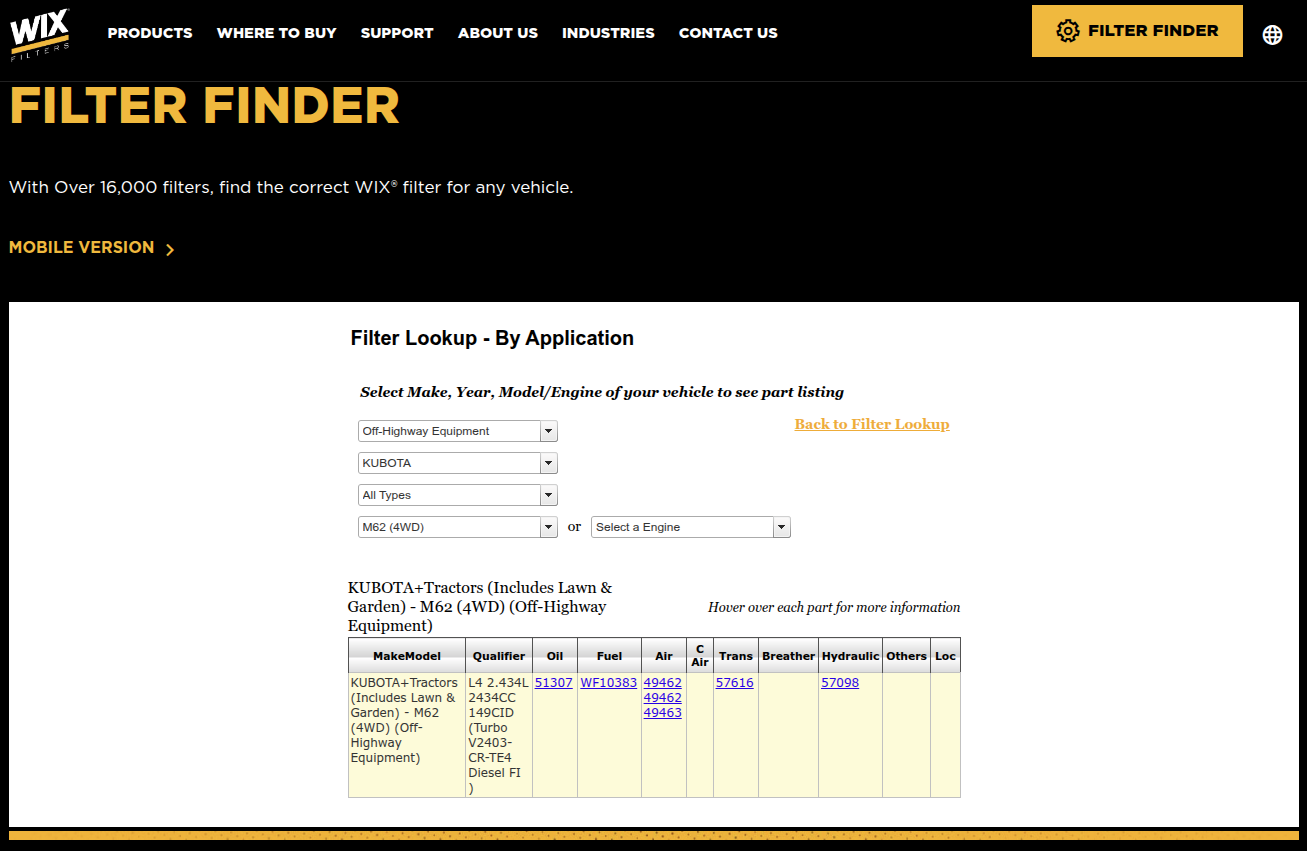
These are the Wix numbers, but we all know it will cross over to NAPA just as easily. I'm going to hold to the UDT2 fluid that Kubota uses for now till I get some research. I'm already enjoying the fact of being able to move dirt now and straighten out the yard and get rid of all the trash pile out here.
Edited by Mopar1973Man