EG4 6000XP + Linux: Monitoring My Whole-House Solar System from the Desktop
Background
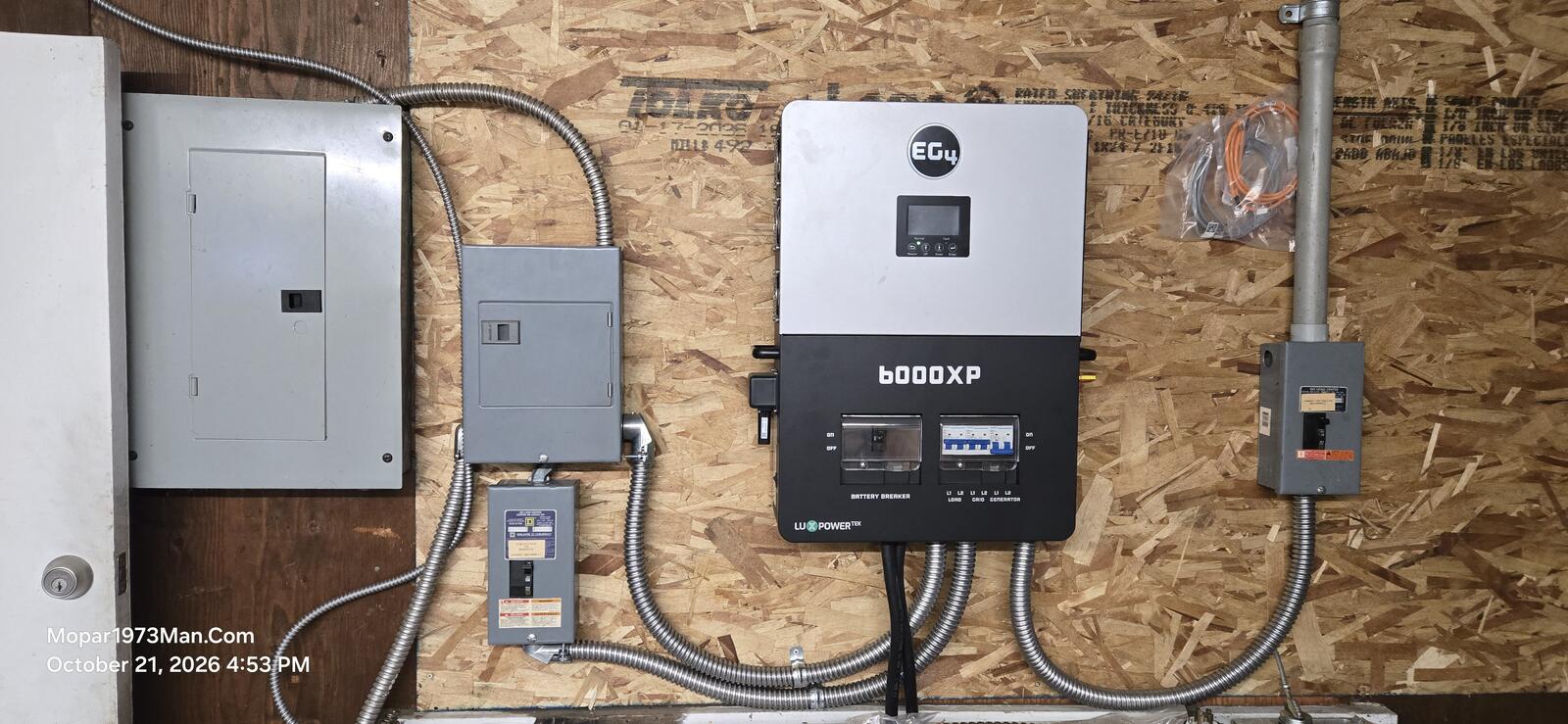
My old Trace inverter blew up, and I replaced it with an EG4 6000XP. It runs the house, charges the battery bank, and can be bypassed if I ever need to pull it out of the loop. What I really wanted was to see everything happening at a glance from my Ubuntu desktop, so I tied it into the rest of my Linux home network.
Batteries: 48V lead-acid bank built from Trojan L16s
Utility: Idaho Power city feed, 200 amp service
Generator: 6000W Harbor Freight unit as a backup source
Overnight charging: the grid charger kicks in at midnight and runs about 5 hours, so the bank is topped off before morning
What It Powers
Nearly the whole house runs through the inverter. The only things kept off it are the big loads:
Cooking stove
Oven
Clothes dryer
HVAC
Those would eat the entire 6000W budget by themselves, so they stay on utility power and everything else gets the benefit of battery and solar backup.
The Linux Side: How I Monitor It
Everything lives on my Ubuntu machines, and I use Conky to put live data right on the desktop of my main workstation (a 2560x1440 screen). I run five panels, all set to autostart at login:
Desktop hardware/network panel: local system stats
Home server panel: CPU, RAM, RAID, and more for my home server
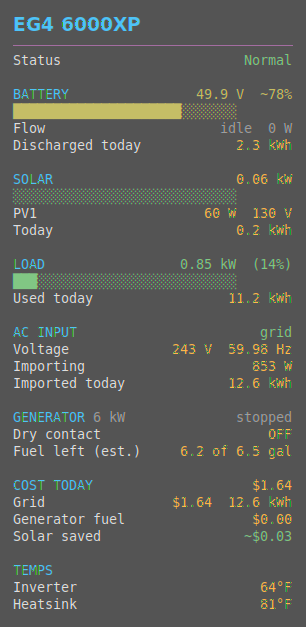
EG4 inverter panel: solar produced, energy used, energy imported from the grid, and battery/inverter status, with dollar figures at 13 cents per kWh. It also shows what the overnight grid charge costs me, plus a generator section for the Harbor Freight (6.5 gallon tank, about 0.5 gal/hr at half load and 0.9 gal/hr at full load).
Weather panel: conditions from my own weather station
The EG4 data comes from the EG4 cloud portal (monitor.eg4electronics.com), which a script pulls on a schedule and feeds to Conky. The weather panel is fed by WeeWX on my home server. It uses a custom driver I wrote that polls my AcuRite Atlas station's data every 60 seconds, so the panel stays current. Temperatures display in °F.
The panels are laid out in the corners of the screen: the live site upper-left, the home server lower-left, the desktop panel upper-right, and the EG4 and weather panels lower-right. Long panels wrap into two columns, which keeps everything readable without covering my work. All the configs live in ~/.config/conky, so copying the setup to another workstation is just a file copy.
The whole desktop background.
The Bigger Picture
The home server runs Ubuntu 24.04 with Virtualmin, ZFS storage, and Omada networking. It ties together the weather data, the web hosting, and my Amcrest cameras, which upload video to it over SFTP. The inverter data is just one more piece of a Linux-based home dashboard where I can see power, weather, servers, and security in one place.
Why I Like This Approach
One glance at my desktop tells me whether the house is running on solar, battery, grid, or generator
Real dollar amounts show what solar is saving and what the overnight charge costs
It's all open and scriptable, with no proprietary app needed on the desktop
The same Conky setup can be copied to any other Linux box in the house
I'm happy to share the Conky configs and scripts if people are interested. Questions welcome!
[Add: screenshot of the desktop with the panels, photos of the inverter and battery bank, solar array details]


EG4 6000XP + Linux: Monitoring My Whole-House Solar System from the Desktop
Background
My old Trace inverter blew up, and I replaced it with an EG4 6000XP. It runs the house, charges the battery bank, and can be bypassed if I ever need to pull it out of the loop. What I really wanted was to see everything happening at a glance from my Ubuntu desktop, so I tied it into the rest of my Linux home network.
The Power Side
Inverter: EG4 6000XP, 6000W split-phase (120/240V)
Batteries: 48V lead-acid bank built from Trojan L16s
Utility: Idaho Power city feed, 200 amp service
Generator: 6000W Harbor Freight unit as a backup source
Overnight charging: the grid charger kicks in at midnight and runs about 5 hours, so the bank is topped off before morning
What It Powers
Nearly the whole house runs through the inverter. The only things kept off it are the big loads:
Cooking stove
Oven
Clothes dryer
HVAC
Those would eat the entire 6000W budget by themselves, so they stay on utility power and everything else gets the benefit of battery and solar backup.
The Linux Side: How I Monitor It
Everything lives on my Ubuntu machines, and I use Conky to put live data right on the desktop of my main workstation (a 2560x1440 screen). I run five panels, all set to autostart at login:
Desktop hardware/network panel: local system stats
Home server panel: CPU, RAM, RAID, and more for my home server
mopar1973man.com panel: the live site's health
EG4 inverter panel: solar produced, energy used, energy imported from the grid, and battery/inverter status, with dollar figures at 13 cents per kWh. It also shows what the overnight grid charge costs me, plus a generator section for the Harbor Freight (6.5 gallon tank, about 0.5 gal/hr at half load and 0.9 gal/hr at full load).
Weather panel: conditions from my own weather station
The EG4 data comes from the EG4 cloud portal (monitor.eg4electronics.com), which a script pulls on a schedule and feeds to Conky. The weather panel is fed by WeeWX on my home server. It uses a custom driver I wrote that polls my AcuRite Atlas station's data every 60 seconds, so the panel stays current. Temperatures display in °F.
The panels are laid out in the corners of the screen: the live site upper-left, the home server lower-left, the desktop panel upper-right, and the EG4 and weather panels lower-right. Long panels wrap into two columns, which keeps everything readable without covering my work. All the configs live in
~/.config/conky, so copying the setup to another workstation is just a file copy.The whole desktop background.
The Bigger Picture
The home server runs Ubuntu 24.04 with Virtualmin, ZFS storage, and Omada networking. It ties together the weather data, the web hosting, and my Amcrest cameras, which upload video to it over SFTP. The inverter data is just one more piece of a Linux-based home dashboard where I can see power, weather, servers, and security in one place.
Why I Like This Approach
One glance at my desktop tells me whether the house is running on solar, battery, grid, or generator
Real dollar amounts show what solar is saving and what the overnight charge costs
It's all open and scriptable, with no proprietary app needed on the desktop
The same Conky setup can be copied to any other Linux box in the house
I'm happy to share the Conky configs and scripts if people are interested. Questions welcome!
[Add: screenshot of the desktop with the panels, photos of the inverter and battery bank, solar array details]
Edited by Mopar1973Man