

Quadzilla Adrenaline with iquad installed!
- Replies 4
- Views 1k
- Created
- Last Reply
Top Posters In This Topic
-
Mopar1973Man 2 posts
-
Doubletrouble 2 posts
A better way to browse. Learn more.
A full-screen app on your home screen with push notifications, badges and more.

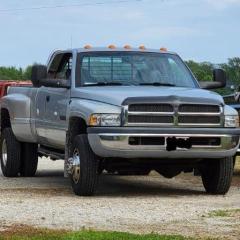
So I finally pulled the trigger on an adrenaline for my 2001 3500. Im after mainly better fuel economy at this point, more so than the power that is possible.
Myself and @Mopar1973Man have discussed this at length and with his economy tune now installed in the quadzilla I will be doing my best to learn how to keep track of and log some milage numbers from my daily driven diesel.
This little endeavor started with Mike and I discussing his milage in the up and down terrain of Idaho. Here in Northwest Ohio the terrain is very flat so the speculations of higher numbers in this area arose. Now that I have the quadzilla installed I will be trying to track my milage closer to compare numbers with Mike's previous posts.
More to come. I'll will try to post something on this weekly since that is roughly my fill up interval as well.
Edited by Mopar1973Man
Helping fix tag.