

All Activity
Today
-
Merica97 joined the community
-
Dave Anderson joined the community
-
Routers, switches, Wi-Fi, cameras, sensors, smart devices and everything that talks over the network. Good topicsSetting up and troubleshooting a home network Wi-Fi coverage and access points Separating smart devices from your main computers Cameras, weather stations and sensors Printers and shared devices Posting tipsDescribe your gear and what's not working. Please don't post passwords or your public IP address, and blur any screenshots that show them. Tell us about your network project below.
Yesterday
-
Parts, builds, cooling and upgrades, for Linux and everything else. Cloud 10 Computers started with custom builds, and this is where that spirit lives on. Good topicsChoosing parts for a new build Upgrades and swapping drives Cooling, noise and power supplies Troubleshooting a PC that won't boot Hardware that works well with Linux When you askList your parts (or model number), your budget, and what you'll use the PC for. Photos help. Show us your build or ask your first question below.
-
Inverters, batteries, generators, solar panels, and the dashboards that tell you what they're all doing. What belongs hereSolar and battery systems, large or small Generators and how they tie into a system Monitoring with dashboards, desktop panels and weather stations Real-world results, including what went wrong Safety firstElectrical work can hurt or kill you and can start fires. Follow your local code and use a licensed electrician where required. Share what you've learned, but please don't treat anything here as a substitute for that. Tell us what you're running and what you want to keep an eye on.
-
This forum covers home servers, web servers, backups, hardening, and safe remote access, in plain English. Ground rulesNever post passwords, keys, tokens, or your real IP addresses. Blur or crop screenshots before posting. Check for hostnames, usernames, and addresses. Keep it to systems you own or have permission to work on. Good first habitsKeep everything updated. Use keys instead of passwords for remote login. Turn on two-factor authentication wherever it's offered. Test your backups. A backup you've never restored is a guess. Ask away, and tell us what you're running and what you're trying to protect.
-
Welcome to the Linux forum. Whether you're curious, fed up with Windows, or already halfway through an install, you're in the right place. Which distro?Any distro is welcome here. If you're brand new, pick something friendly like Linux Mint or Ubuntu and don't overthink it. You can always change later. Before you installBack up your files first. Always. Try a live USB before committing to a full install. Check that your key programs have a Linux version or a good alternative. How to ask for helpTell us your distro and version, your hardware, what you expected, what happened, and any error message. The more detail, the faster the answer. Never post passwords, keys, or private addresses. Everyone here started as a beginner, so no question is too basic. Introduce yourself below and tell us what you're trying to do.
-
Thor, my 2006 Dodge Ram 3500, is getting new headlights and LED bulbs. They're ordered, and I'll document the swap with photos. What's ComingI ordered [the headlight assemblies: brand or type] and [LED bulbs: which positions]. They're on the way, and I'll put them in as soon as they arrive. Why[What's wrong with the old ones: hazy, dim, cracked, or something else.] With winter coming and a plow possibly going on the truck, I want to see well on dark roads. What I'll CoverBefore and after photos The parts and what they cost How the swap goes on a 2006 Ram, including anything that fights back Whether the LED bulbs are worth it, and how the beams look once they're aimed Your TurnHave you swapped headlights or bulbs on a 2003-2009 Ram? Tell me in the comments what to watch for before I get started. More soon, with photos. — Titanium (formerly Mopar1973Man)
-
An update on Mopar1973Man.Com: what happened, what's changing, and what's coming in diesel, Linux and servers, Titanium and Suzanna's jewelry. The landslide on May 29, 2025 took my shop, and it took over my life for much of the year since. Nearly all my time went to cleanup and keeping the vehicles running, and the website got left behind. Thanks to everyone who stuck around and kept checking in, including the guys who called nearly every day. You know who you are. A New NameMopar1973Man is retiring, and you'll know me as Titanium from here on. I explained why in Mopar1973Man Is Retiring: Meet Titanium. The site keeps its address and everything on it. Getting the Foundation Back in OrderI got control of the mopar1973man.com domain back after my old registrar was bought out, which was a bigger headache than it sounds. The forum software is current, and I'm reorganizing the site so things are easier to find. SecurityWith the site untended for so long, the first job was a security check-up, and most of it is done. I wrote it up in Cloud 10 Is Back: Getting the Servers in Shape. If you're a member, it's a good time to update your own password, especially if you reuse it on other sites. If anything on the site looks off, like strange links or odd emails, send me a message. One Site, Four SidesDiesel (Mopar1973Man.Com): This is where it all started in 2007, when I was just writing down how to fix my own Dodge Ram Cummins. Repair notes, how-tos and downloads for Cummins and Dodge owners will stay the core of the site. Cloud 10 Computers: I built custom PCs for years, and now I want to help people make the jump from Windows to Linux. Servers, networking and security live in The Server Room. Titanium: The more personal, creative side of the site. Meet the character at the Titanium blog. Suzanna's Jewelry: My wife Suzanna is making jewelry and will have a small corner of the site to show it off. Coming soon. Beast and ThorI can't do the heavy lifting or the under-the-truck work anymore, so some jobs will be hired out or done with a helping hand. I'll document each one either way. Here's what's on the list for Thor, my 2006 Ram 3500: A passenger-side wheel joint, before the worst of winter Headlights and LED bulbs, already ordered, with photos of the install to come A new Bluetooth stereo Plow work, including fixing the controls, and possibly a Fisher V plow for the season Beast, my 2002 Ram 2500, has a new dash waiting for me, but no place to install it with winter storms coming. I'll log it here when the weather and a workspace line up. Refreshing the ArticlesThere are nearly 700 articles on this site, and a lot of them haven't been touched in years. I'm going back through them one at a time to update what's out of date, add what's missing, and clean up the layout. Web addresses stay the same, so your bookmarks still work. If you've used an article and something was wrong or confusing, tell me in the comments, and tell me which ones you want done first. Cummins Help by Video CallI'm setting up paid, scheduled video calls for Cummins and Dodge owners. You point your phone or laptop at the engine bay, and I'll walk you through it live. You can show me the problem, and I can show you where things are. The plan is $45 for a quick question, $100 for a one-hour session, and $125 for a hard diagnosis. Booking details are coming soon. The GoalGet the site back to the top, with real experience from someone who's done the work, not recycled filler. This is a hobby site now, but subscriptions and downloads are still available, and I'm cleaning up the ad side so the site can help pay for itself. A landslide update is coming soon too. What would you like to see covered first? Tell me in the comments. More soon. — Titanium (formerly Mopar1973Man)
-
Mopar1973Man is retiring. He isn't gone, but his body can't do the work anymore. Here's why, and who's taking over: Titanium. Today I'm holding a funeral for Mopar1973Man. Don't worry, nobody died. But the man behind that name can't keep going the way he did, and it's time to say so. Who Mopar1973Man WasMopar1973Man was my whole way of life. He started as a 14-year-old running a BBS in 1984, graduated from ITT Tech in 1989, and built custom PCs under the Cloud 10 Computers name from 1994 to 2008. In 2007 he started writing down how to fix his own Dodge Ram Cummins so he wouldn't forget, and those notes grew into this website. He spent years under trucks and in the shop, answering questions from people he had never met, some of them from the other side of the world. What ChangedTwo rounds of bladder cancer, at Christmas 2018 and again at Christmas 2023, cost me my bladder and left me with permanent changes to how my body works. That includes a lasting limit on what I can lift, and crawling under trucks and wrestling clutch jobs are no longer safe for me. Then a landslide on May 29, 2025 took my diesel shop and everything in it. Hit twice by cancer, knocked down again by the slide, and still here rebuilding. Mopar1973Man can't be that guy anymore. Who Titanium IsTitanium was born during chemo. I was sick for a long time and alone, and I needed a way to keep my spirits up. So I created a character, and Titanium became the face I could put on to get through it, and the smiles that came with it. Somewhere along the way it stuck. It's strong, it doesn't give up, and it takes a beating. Same person behind the keyboard, just a name that fits where I am now. If you want to meet the character, visit the Titanium blog. What Stays the SameThe website keeps its address and everything on it. Every article written under the Mopar1973Man name stays right where it is, with his name on it. I still hold the name, and what I know about these trucks isn't going anywhere. I'm just going to share it differently: more explaining and teaching, less lying on the ground. What Happens NextI'm refreshing the articles one at a time, logging what happens with Beast and Thor, and starting a new computer, server and Linux blog under the Cloud 10 Computers name. I'm also working on a way to help people with their Cummins problems over live video, so you can show me your truck and I can show you where things are. Rest easy, Mopar1973Man. Thank you for everything. Titanium takes it from here. — Titanium (formerly Mopar1973Man)
-
Cloud 10 Computers is back as the home for servers, networking, Linux and security. Here's the first project: a full security check-up on my own servers. Cloud 10 Computers started in 1994 as my custom PC building business, and it's returning as the home for everything computer-related on this site. The first project was my own backyard. While the site sat untended, I did a full security check-up and cleaned up the servers. In general terms, here's what that meant. UpdatesThe forum software, PHP and the operating system are all brought current. Old software is one of the easiest ways in for attackers, so this comes first. Locking Down Remote AccessI moved to key-based logins, turned off password logins wherever I could, and set up automatic blocking for repeated failed attempts. Servers on the internet get probed constantly, and this is the single best reason not to skip it. Keeping Databases PrivateDatabases now only talk to the server they live on, not the open internet. CleanupOld accounts, leftover copies of the site and unused files are gone, and the site's files now sit in a cleaner folder layout. The web address didn't change. A Private TunnelI built an encrypted tunnel so I can reach my servers from anywhere without exposing my home network to the internet. It lets me keep an eye on everything while I'm away from the desk. What's NextIn the coming weeks I'll write these up step by step for anyone who wants to do the same on a home server or a small website, along with beginner-friendly guides for moving from Windows to Linux. If there's a topic you want first, tell me in the comments. — Titanium
-
Titanium joined the community
Last week
-
Matt marinow joined the community
-
Mine were all raised exceptionally poor chamfers on all holes leading to threads surface was raised. I had to fix it before bolting clutch to it. I sent a email to valair with no response. Was just the hd 13" organic. Was first and last valair purchase
-
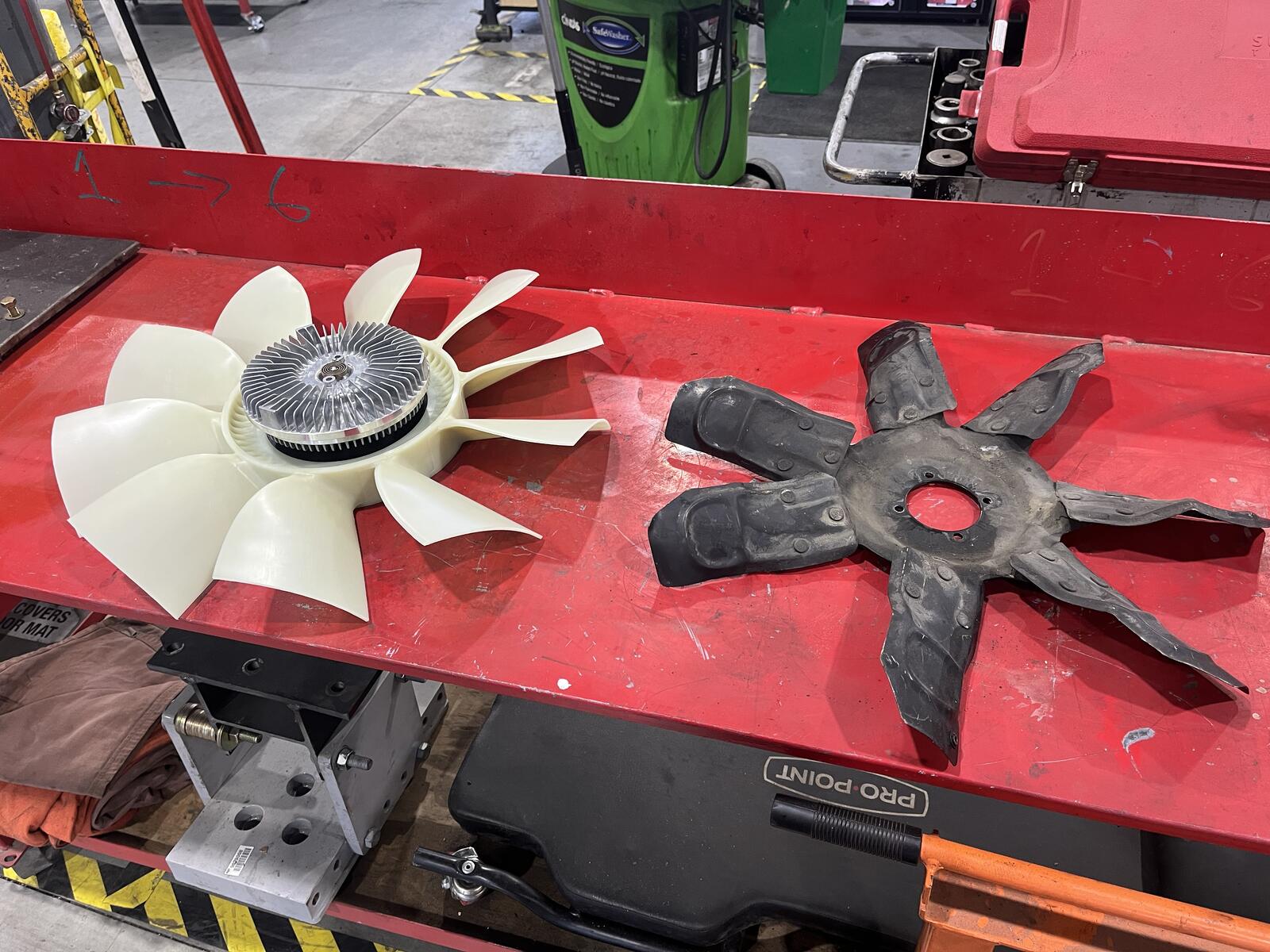
Kinda, I mimicked the dimensions of the oem fan. 3rd gen + fans are CCW that's why none of them work for us. This one is 2.9" wide while the oem is 2.5"
-
Dude I love it that is a full size 3rd Gen fan basically to fit a 2nd gen.
-
Just a teaser of what’s to come. I designed this and just received it in the mail yesterday. I had an engine fan manufacturer make this to my specs and after some future test fitting and such I hope it to be available for everyone who wants one. After I’m sure it works I’ll make a post about how to get one and what needs to be done to make it work (i.e. does it work with a Fluidampr? etc etc) I do this for the advancement of our 2nd gen community. I will not make a penny on this. I imagine my design would be stolen and copied once they’re available on the market but alas, it is life. Stay tuned…
-
I used the Valair QNV56DDSN-ORG clutch. Much much quieter then a SBC DD 3250 I ran years ago. It 's enjoyable to drive. Yes, I installed it. It went together perfectly first go.
-
mfdoom joined the community
-
Trisyan joined the community
-
enolam1 joined the community
-
Did you replace pump yet?
-
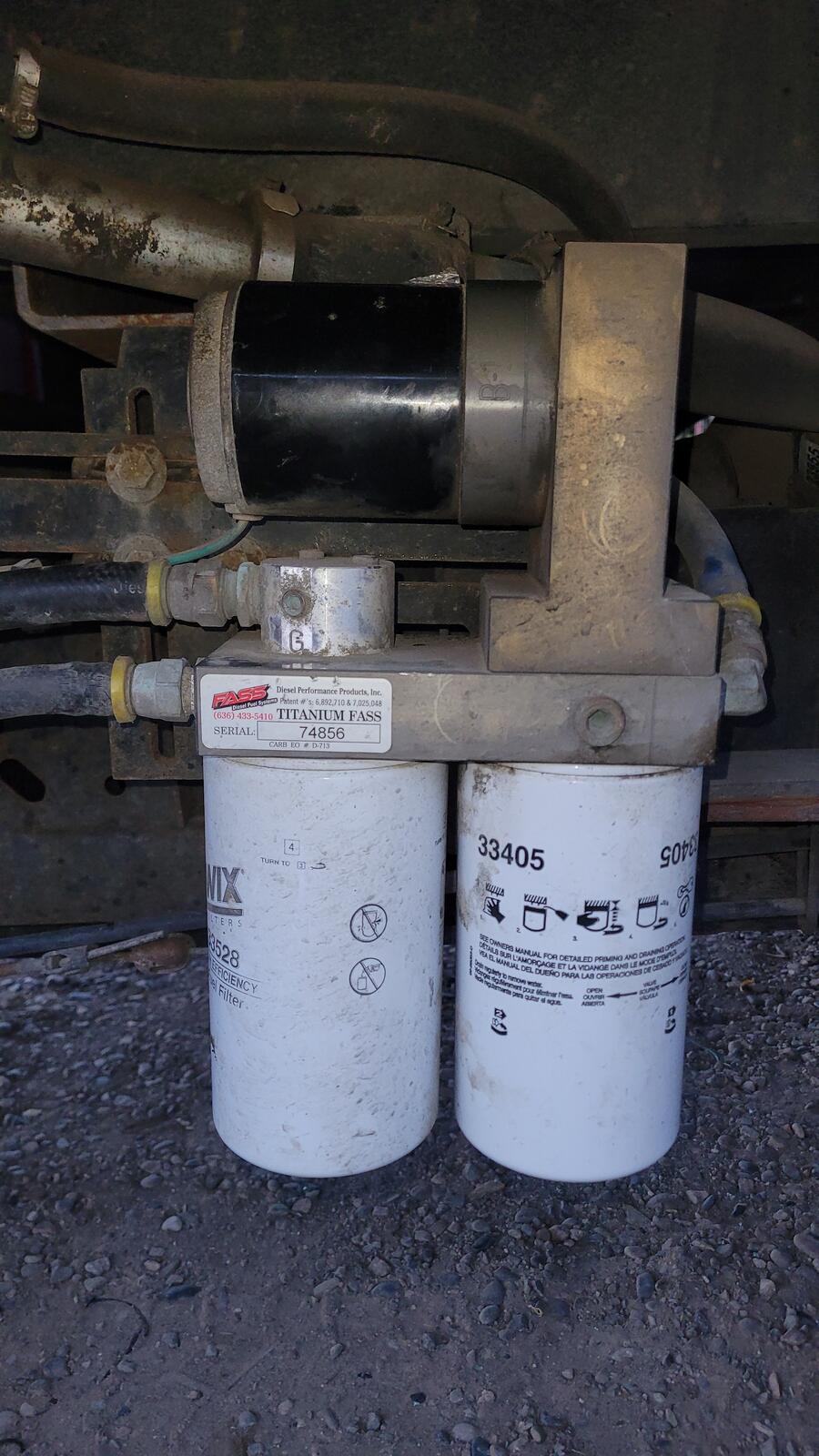
So i spent quute alot of time today on hold at fass also emailed them twice. Have a few hours into this with out success. Figured out the rpt1005 fits my fass titanium directly of wich is discontinued The rpts1005 is its replacement few upgrades whisper technology etc. These are 165gph units. The power connection plug might be differnt apparently fass changed plug 4 years ago. Orderd rpt10005 through diesel performance parts i got my valair clutch through them. The guys at diesel performance parts were very helpfull did some digging themselves to be sure that the rpt and rpts are interchangeable other than maybe plug. Fass not so much. Anyways thats all i got Guess nothing on the truck will take a **** sitn in driveway waiting for pump.
-
Sorry I've been hung up working on many other things. @Mace what clutch did you get?
-
What I've Been Up To: Landslides, Servers, and a Talking Computer Named RaymondOct 21, 2026 · @Titanium If you've noticed I've been a little quiet around here, this post is why. The landslide took my shop and every tool in it, and my cancer means I'm not allowed to lift more than 40 pounds. So I've been putting my energy into what I can still do, which is sharing what I know and building things with computers. The HillsideOn May 29th, 2025, the hillside behind the house let go and buried the diesel shop. Everything in it was destroyed, tools included. Since then, Tweety Bird and I have been cleaning up, and this past June I bought a Kubota M62 tractor to do the heavy moving my back can't. We're still sifting the slide dirt for debris, saving the bigger concrete for a foundation, and planning a 40-foot connex box as a mini shop for fuel, firewood, and tools. I'll post more as it takes shape. What I Still Have: The KnowledgeI can't turn wrenches right now, but I haven't lost what I know, and that was always the most valuable thing in the shop. I started running a BBS in 1984 at age 14. I graduated from ITT Tech in 1989 and ran Cloud 10 Computers, a custom PC building business, from 1994 to 2008. In 2004 I hand-coded my first website in plain HTML4. On October 4, 2007, I started Mopar1973Man.Com as personal notes for fixing Dodge Ram Cummins diesels, so I wouldn't have to figure out the same repair twice. Those notes grew into the site you're reading now. Over the years, people have found it from all over. I've had calls and messages from Poland, Australia, and Germany, among other places, and many of them keep coming back to the site. That tells me the knowledge here is worth something, even with the shop gone. So I'm building a way to keep putting it to work: More articles. I want to write up the stories behind what I've done, including Cummins repair notes, the computers and networking side, and the landslide itself, and explain how I did each one so you can follow along. One-on-one help. If you're stuck on a Cummins problem, I want you to be able to talk to someone who has been through it. Paid consulting calls. I'm setting this up through the site's own subscriptions and gift cards, so booking time with me is simple. It's a way for me to keep helping people with these engines without a shop and without lifting a thing. Video. I'd like to add video to the mix, so you can see the problem explained and not just read about it. Vehicle Maintenance add-on. I'm also building a custom add-on for the forum where each member can keep their own garage and log service records: date, mileage, service type, cost, parts, and reminders for the next service. Taking Care of the Live SiteI've spent a good chunk of October on the server that runs the site. Here's the short version: I upgraded the forum software to Invision Community 5.0.20. The site now runs PHP 8.3, up from 8.2. I added stronger browser security headers and tightened up how the server handles logins. I tracked down and fixed a mail problem that was quietly blocking outgoing email. It was a one-line relay rule that had been missing, and it took a while to find. None of this changes how the site looks, but it keeps things running safely, which matters more now that I'm adding paid services. The Home Network RebuildThe rest of my energy has gone into rebuilding the home network from the ground up. Storage. The home server has four 4TB NVMe drives, which I pooled into one ZFS array with redundancy so a drive failure doesn't take anything with it. Each user gets their own managed slice of space. I did lose some old camera footage along the way when a partition got deleted before I'd migrated it. That one was a lesson, and the cameras are recording fresh footage now. Backups. Every night at 2AM the server wakes the workstations, backs up their data, installs updates, and puts them back to sleep. It never touches a machine while someone is logged in. Weather station. My AcuRite Atlas feeds a custom WeeWX setup I built that reads the data straight from the cloud, while the weather service keeps getting its own copy as before. I recently wiped the database clean to start fresh, so the history begins from mid-October. Power. An EG4 6000XP inverter now handles the house after my old Trace inverter blew. It runs off the 48V Trojan battery bank. Game server. It's not all work. The home server also runs my own Rust game server, just for fun. Tweety Bird and I both play on Ubuntu Linux through Steam, so it's something we can do together from our own desktops. I moved it onto the ZFS pool with everything else, so it has plenty of room and gets the same protection as the rest of the server. Everything at a Glance: My Conky DashboardWith this many moving parts, I needed a way to see the whole picture without logging into five different things. So I built a set of Conky panels that sit right on my desktop and start automatically every time I log in. They show me: The live website server. This is the server running mopar1973man.com, so I can tell right away if the site is healthy. The home server. CPU, memory, storage, and the rest of what's running behind the scenes at home. The EG4 inverter. Battery and power status pulled from the inverter's cloud portal, so I always know how the house is holding up. The weather station. Live readings from the Atlas, straight from the WeeWX setup on the home server. My own desktop. A main hardware and network panel for the machine I'm sitting at. The panels are tucked into the corners of my screen with the longer ones wrapped into two columns, so they stay out of the way but are always there when I look up. Two servers, the power system, and the weather, all in one glance. I'm planning to copy the same setup to Tweety Bird's computer too. Meet RaymondThe project I've had the most fun with is Raymond, my local AI assistant. Both workstations have an NVIDIA RTX 5060 Ti with 16GB of video memory, so I'm running AI models right here at home with Ollama instead of sending everything to the cloud. The server acts as traffic cop. It wakes up whichever workstation is available and sends the request there. I talk to Raymond through a web interface, and he talks back with a voice. He can run commands and work in his own sandboxed folder. He can also connect to the workstations through a limited account, which is enough to check the nightly maintenance logs for me. I'm still testing models to see how far a local setup can go on the kind of work I do. Thanks for Sticking AroundThanks to everyone who has called, checked in, or just kept coming back to the site while I've been busy. The shop will come back, and in the meantime the knowledge is still here. I'll keep posting updates as the new features go live. Until next time, Mopar1973Man
-
I know that the bad luck was there. After a long hard cold look at the tractor and started working it like a Cummins the problems sort its self out. Just makes it difficult when there is no Shop Manual for specs and information. I've got it running much better now and the project is still moving dirt.
-
Can i replace the 95gph motor with a 165gph. Its only like 12 bucks more. Fass is closed but id like to order a motor tonight this one sounds kinda like the transmission with rocks in it. I was cruising home today in 5th at 70 trucked buck so im thinking you peice of ****. Put it in 4th and stood on it cause im thinking you freaking pos trans. Pushing throttle only made it buck and studder. Verifued **** i got no fuel and made it home to mtn home going 60 in fith. Truck stumbling pulling all the steep grades to mtn home. Ughhhh ever werk so far having this truck is something. I did back on pump motor with a rachet and that only made it shut completly off. I do have a airdog raptor spare but the fuel line are different because it doesnt have filters. Thanks for any help.
Earlier
-
@Mopar1973Man Will the 00' pcm work with the 02' ecu if the 02' ecu of flashed to be (auto) instead of its original (manual)? *I need/want to keep electronic cruise control. 2nd option- if not* Can the 00' pcm be updated to work with the flashed 02' ecu (auto) ? Absolute worst case*, I still have them 00' ecu. Then it will all be 00' electronics, ecu, pcm etc. And if need be, hopefully they can still add the 3 cyl hugh idle and 6 cyl high idle. Ill just have to either live without cc or try and mess with the parts left over to make it work. Just to note the engine will still be the 02' HO but with a SO pump. *I guess another curious question is: What all can auto computer specialists actually program with ecu and pcm for our trucks?
-
ATF <-> Coolant cooler you can ditch if you have enough to keep your transmission temperature under control. ECM and PCM will need to be flashed to match what you are putting together.
-
Idk if I'd attempt a full auto trans rebuild. The nv5600 wasn't extremely hard just tedious. Im looking at 9k eitherway I choose firepunk or randys. Only difference is randys is for 650 hp and firepunk is at 850 hp. Don't know which is better still only the fact that Ill have a really nice buffer zone for hp goals for FP rated at 850, cause I'll never hit that with this build unless I spray. Still not overly sure I have to have the ant eater, it would make "trans tunes" a cake walk. Still lots of questions about ecu and pcm though. Haven't had anyone suggest any helpful tips or answers to those yet....?
-
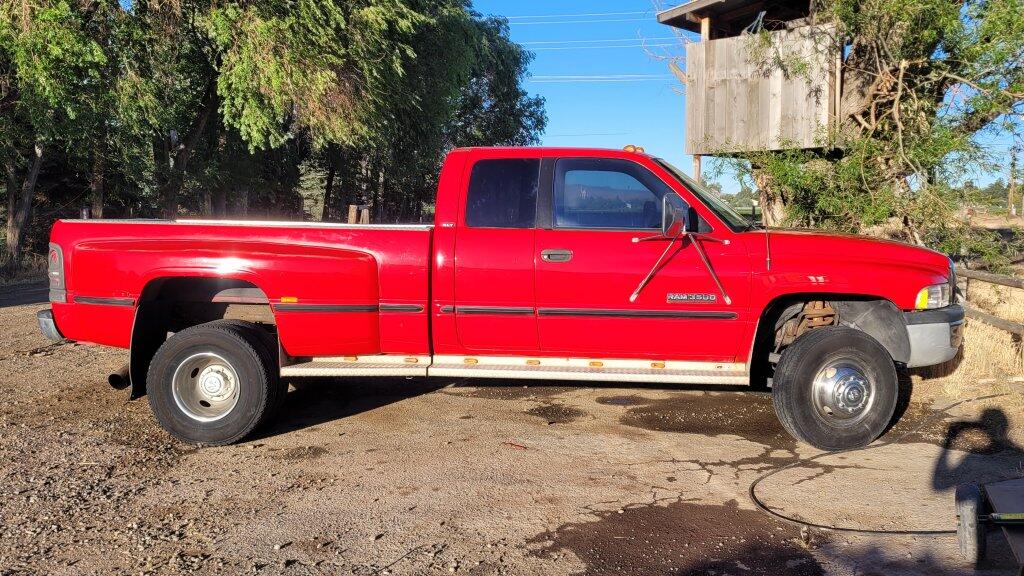
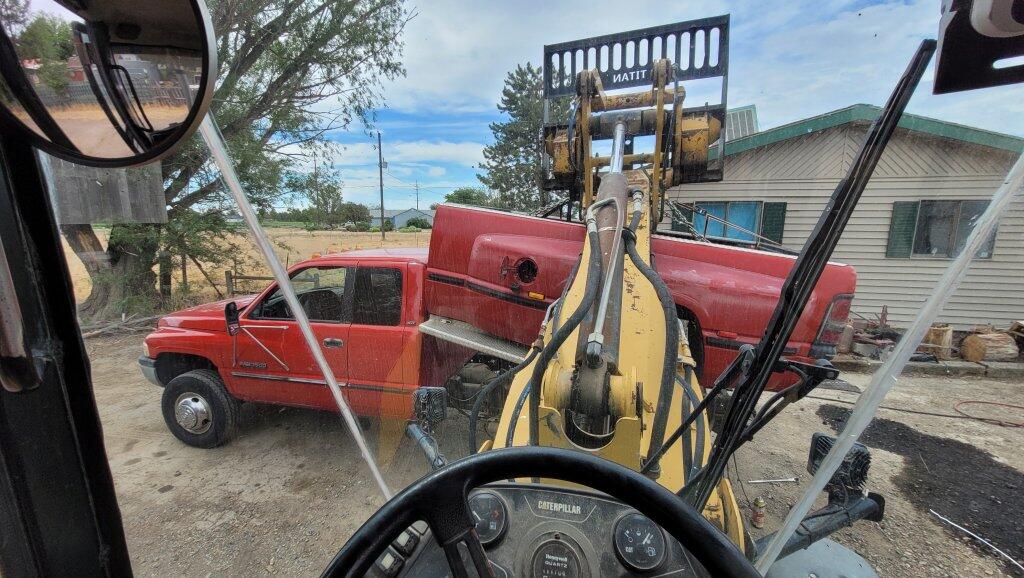
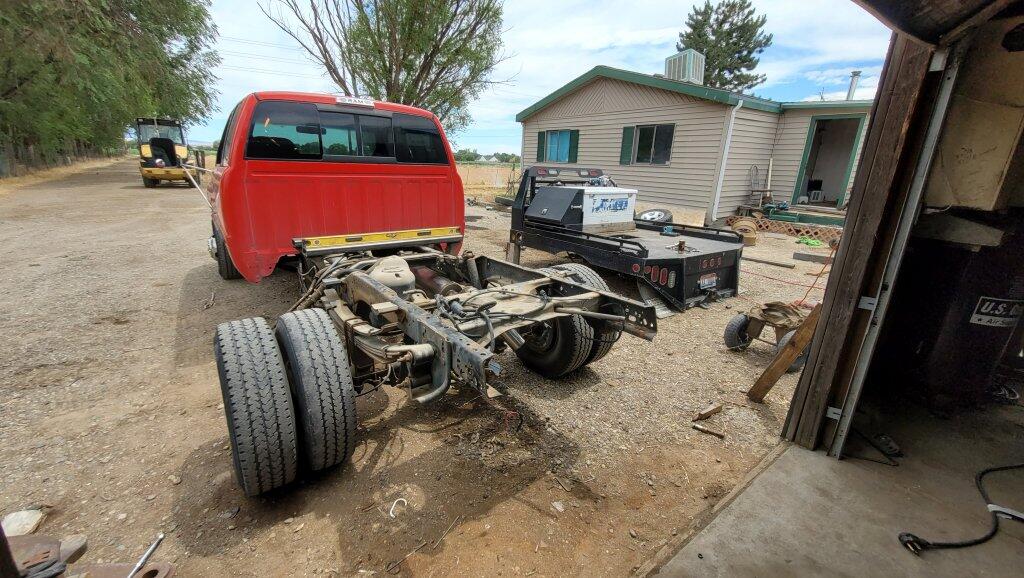
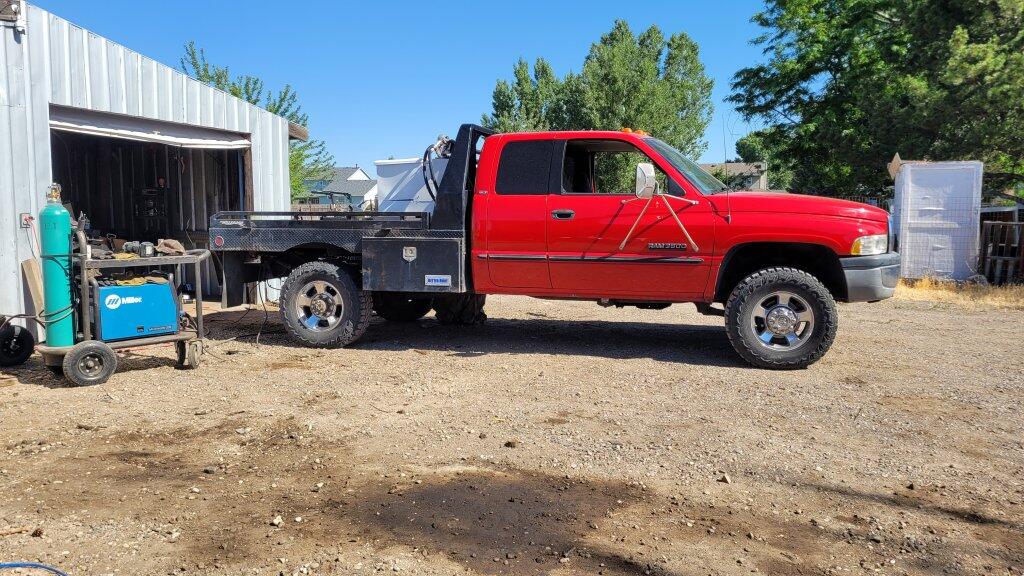
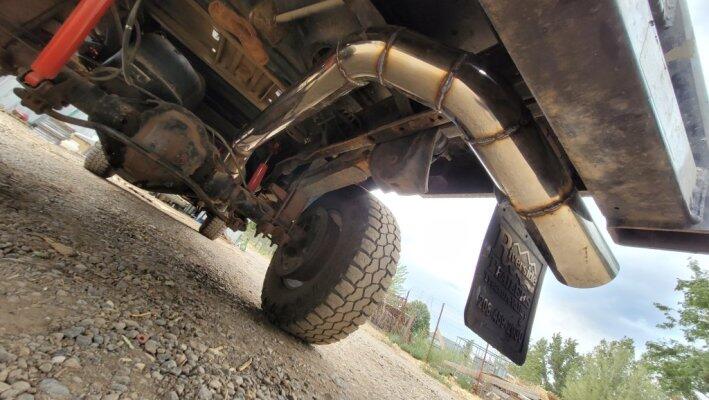
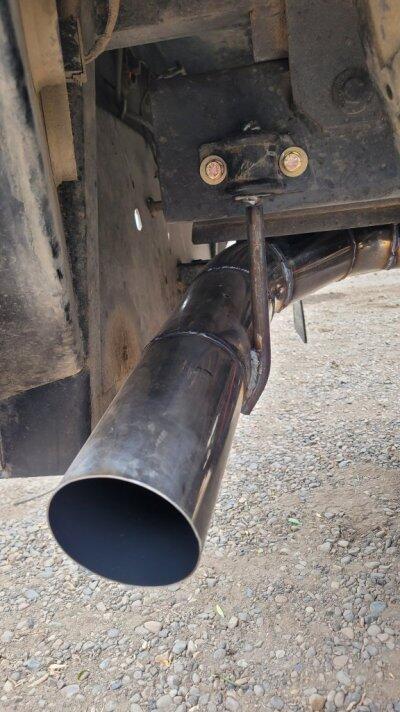
Im not super excited about 2nd gens or even diesels in general but even still this truck is winning me over again. Had trim on the bed so i thought for sure it was a 12v. After knocking on the door and asking if it might be for sale Even though its a 24 and a dually i couldnt pass it up so went got cash then spent the next hour cleaning battery cables. Truck was dead after sitting apmost 2 years. Did get her going and drove it home. Then virtually almost day one the oem exhaust literlt fell out. So i did a 4" stainless axle dump. Then later fit it to the bed Put a 2din head unit in best mod so far. Fabbed a winch bumper. Then 10k miles go by and transmission gets what sounds like rocks in it. Spent some time refreshed trans and replaced all broken bits. This is atleast the second time its been refreshed Exhaust hanger is a jeep sway bar bracket. Ive found these to be the best hangers ive ever made or seen. I think thats about it for now. Buying parts for the transmission kinda broke me. I thought real hard about putting a 47re in it. If id had a spare 47 it would be a no brainer. Next must change is the mirrors. With these things its like brail to change lanes So nice to be able to share pictures This truck does have a pac brake i do t much care to tow with little trucks so i never use it I did measure outlet ill eventually run 4" all the way. Calippers say its a true 4" outlet https://youtube.com/shorts/ETMieKWGT5s?is=opa80VIvYXaGIQvm
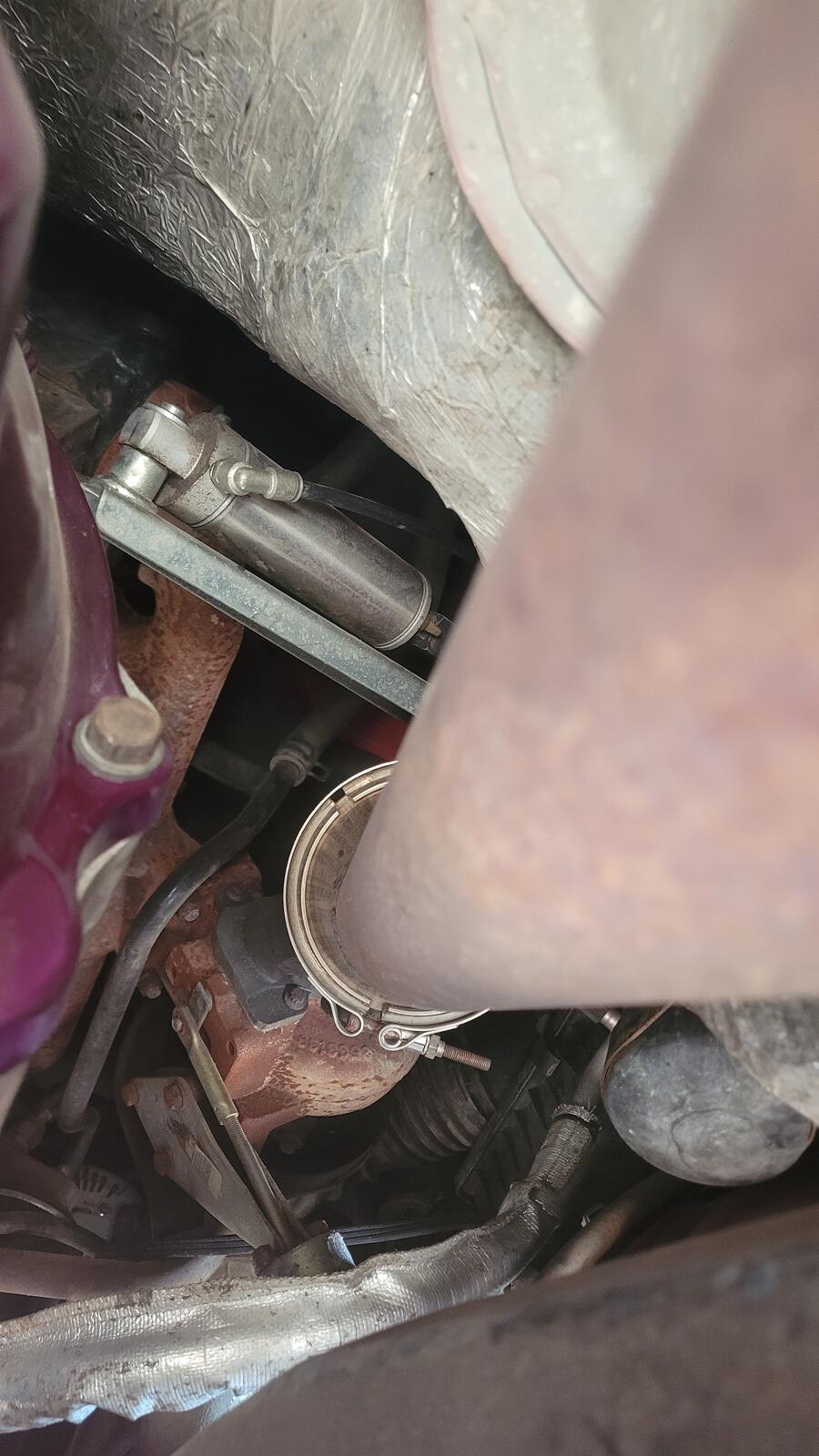
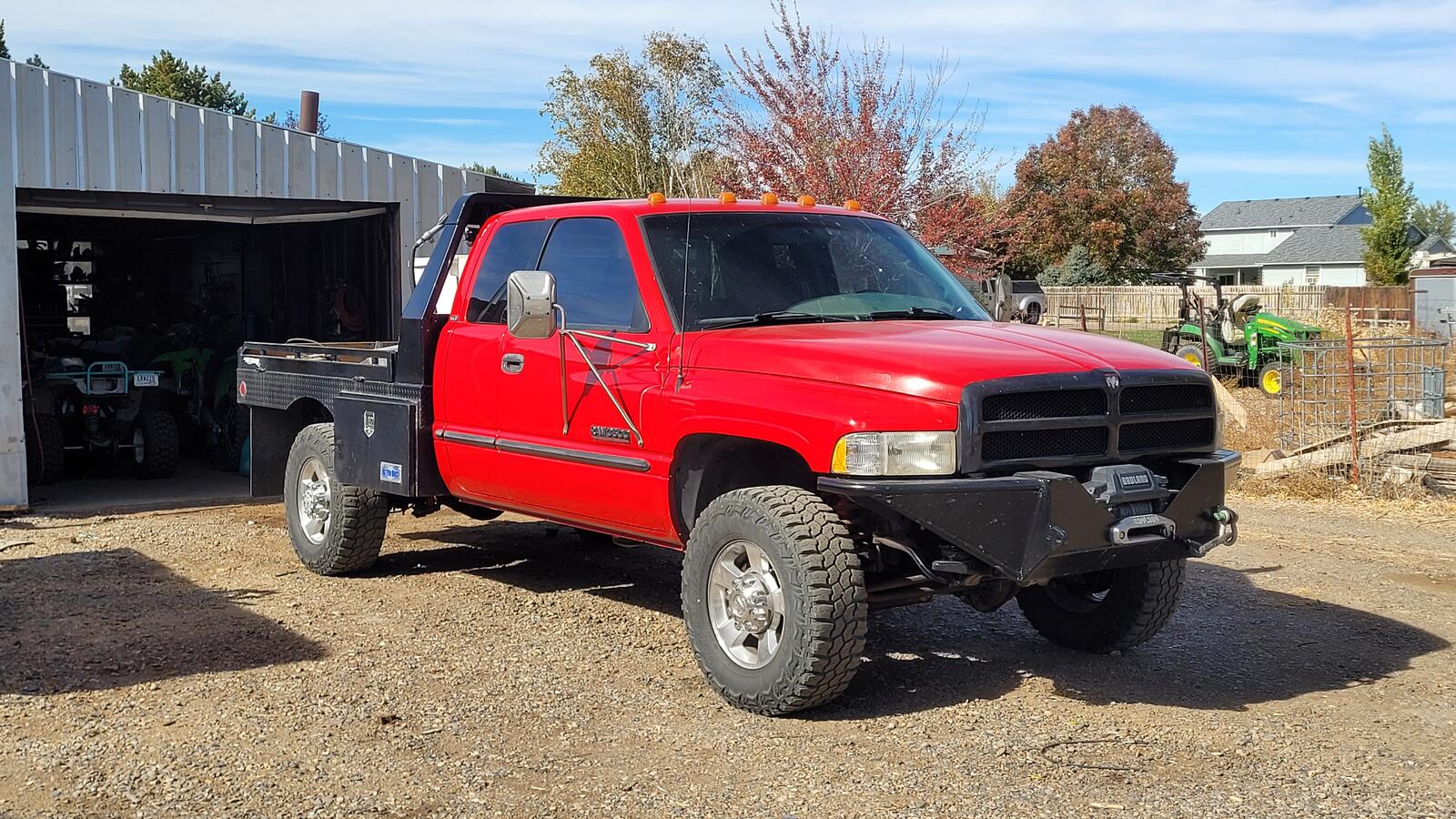
-
Does the oem 2500 and 3500 share same box. Had no issues with my 3500 steering bix steering 35-37" tires for over 200k now










1.thumb.jpg.74c1b7da4c75becf0655089ac29de0a1.jpg)