
Mopar1973Man
Owner
-
Joined
-
Last visited
Everything posted by Mopar1973Man
-
That's why I'm asking as many people to try this mod out and see... I'm wondering if the 2.2K ohm does good for everyone or maybe a different climate requires something else... I don't know... But I would say any value that you would normally see during your high MPG numbers would be a good place to start...
-
Good lord pick on the new guy... Seem like we are swapping members back and forth between ITD.com and here...
-
Hmmm... Sorry no XBox here... I might have to hook you up with a friend in New Meadows thats a big battlefield player... But I understand the wind down time... Sometimes I fire up Dragon's Age and get into the roll playing...
-
Fuel heater kicks in at 60*F and heats till 70*F or so. This is NOT ECM controlled... Air in the diesel is bad because air is compressable. Just like your brakes on your truck if you have air in the brakes the pedal is mushy. Well now same thing on injection pumps. Injection pump is like you master cylinder and the air in the fuel is just like air in the brakes so it takes more force of the injection pump to pop the injectors hence the timing is LATE and the power is reduced. Good fuel pressure is between 14-20 PSI. This will hold the overflow valve open and keep the vP44 electronics cool and the pump happy. Below 14 PSI the overflow valve starts closing and is completely closed by 10 PSI now you extra cooling and lubing is SHUT DOWN... Hence why the pressure gauge is marked in yellow 10-12 PSI... Same sense of running these engines low in oil pressure the engine will still run fine at 10 PSI of oil pressure but don't expect the engine to last long. Just like the injection pump if the fuel pressure low then wear and damage will occur. Remember the only lubricant the VP44 sees is the fuel itself so if you low on pressure you loooking at doing damage.
-
Ok... I got tidbits for you here... I got called out fo fix a 1991 Ford F150 that been sitting for several years. Battery was good and placed a battery charger on it. No fuel and found out someone had pulled the dual tank module under the dash. Using a paper clip I bridge between the +12V and the front tank pump. Now have fuel in the rail. But only firing on 1 cylinder... We spent over 2 hours cleaning fouled plugs and still only firing on 1 cylinder. Problem... The rotor had burned a hole straight through to the shaft. So for testing purpose I cut up a old water bottle making a small disc and packed a dry paper towel on top. Bam! It fired up and ran for a short period till it found a way around the paper and plastic... So what I'm getting at is look REALLY close at all ignition parts make sure they are clean! Look for burns or carbon tracks that could cause problems. I've seen old school Chevy HEI coils crack and leak spark...
-
I like the relay idea... just I know I got to get down to Boise, ID to find anything like that though... :banghead:
-
I was hoping to see CajFlynn post up some more trailer pics too here...
-
Very interesting to say the least...
-
What I look at is the fact of how the price of crude oil will effect everyone. I know there is a political ties here (which I will not get into) but the fact is at least the information is there for anyone to read and they can plan accordly for increase of prices in fuel. Like myself I'm a long ways from any kind of big city or supplies as this will have a direct impact on my plans of travel this year.
-
Any line retriction will come and bite you... Because the smallest orfice (banjo bolts) dictate the max volume it will supply at the VP44...
-
Adding to the thread more information... http://www.rumormillnews.com/cgi-bin/forum.cgi?read=198282 http://www.usgs.gov/newsroom/article.asp?ID=1911 AND THEY THOUGHT THE AMERICAN PEOPLE WOULD NEVER FIND THIS OUT!? [VKD] ----------------------------------------------------------- OIL---you better be sitting down when you read this ! ! You "will" pay $5 a gallon + again and you won't complain loud enough to make a difference, RIGHT! Here's an astonishing read. Important and verifiable information : About 6 months ago, the writer was watching a news program on oil and one of the Forbes Bros. was the guest. The host said to Forbes, "I am going to ask you a direct question and I would like a direct answer; how much oil does the U.S. have in the ground?" Forbes did not miss a beat, he said, "more than all the Middle East put together." Please read below. The U. S. Geological Service issued a report in April 2008 that only scientists and oil men knew was coming, but man was it big. It was a revised report (hadn't been updated since 1995) on how much oil was in this area of the western 2/3 of North Dakota, western South Dakota, and extreme eastern Montana ..... check THIS out: The Bakken is the largest domestic oil discovery since Alaska 's Prudhoe Bay , and has the potential to eliminate all American dependence on foreign oil. The Energy Information Administration (EIA) estimates it at 503 billion barrels. Even if just 10% of the oil is recoverable... at $107 a barrel, we're looking at a resource base worth more than $5...3 trillion. "When I first briefed legislators on this, you could practically see their jaws hit the floor. They had no idea.." says Terry Johnson, the Montana Legislature's financial analyst. "This sizeable find is now the highest-producing onshore oil field found in the past 56 years," reports The Pittsburgh Post Gazette. It's a formation known as the Williston Basin , but is more commonly referred to as the 'Bakken.' It stretches from Northern Montana , through North Dakota and into Canada . For years, U. S. oil exploration has been considered a dead end. Even the 'Big Oil' companies gave up searching for major oil wells decades ago. However, a recent technological breakthrough has opened up the Bakken's massive reserves..... and we now have access of up to 500 billion barrels. And because this is light, sweet oil, those billions of barrels will cost Americans just $16 PER BARREL! That's enough crude to fully fuel the American economy for 2041 years straight. And if THAT didn't throw you on the floor, then this next one should - because it's from 2006! U.. S. Oil Discovery- Largest Reserve in the World Stansberry Report Online - 4/20/2006 Hidden 1,000 feet beneath the surface of the Rocky Mountains lies the largest untapped oil reserve in the world. It is more than 2 TRILLION barrels. On August 8, 2005 President Bush mandated its extraction. In three and a half years of high oil prices none has been extracted. With this mother load of oil why are we still fighting over off-shore drilling? They reported this stunning news: We have more oil inside our borders, than all the other proven reserves on earth.. Here are the official estimates: - 8-times as much oil as Saudi Arabia - 18-times as much oil as Iraq - 21-times as much oil as Kuwait - 22-times as much oil as Iran - 500-times as much oil as Yemen - and it's all right here in the Western United States . HOW can this BE? HOW can we NOT BE extracting this? Because the environmentalists and others have blocked all efforts to help America become independent of foreign oil! Again, we are letting a small group of people dictate our lives and our economy.....WHY? James Bartis, lead researcher with the study says we've got more oil in this very compact area than the entire Middle East -more than 2 TRILLION barrels untapped. That's more than all the proven oil reserves of crude oil in the world today, reports The Denver Post. Don't think 'OPEC' will drop its price - even with this find? Think again! It's all about the competitive marketplace, - it has to. Think OPEC just might be funding the environmentalists? Got your attention yet? Now, while you're thinking about it, do this: Pass this along. If you don't take a little time to do this, then you should stifle yourself the next time you complain about gas prices - by doing NOTHING, you forfeit your right to complain. Now I just wonder what would happen in this country if every one of you sent this to every one in your address book. By the way...this is all true. Check it out at the link below!!! GOOGLE it, or follow this link. It will blow your mind. http://www.usgs.gov/newsroom/article.asp?ID=1911
-
That's why you draw a vacuum on the system to remove any freon residue and moisture. That why the measured amount of freon its to keep a person from over loading the system...
-
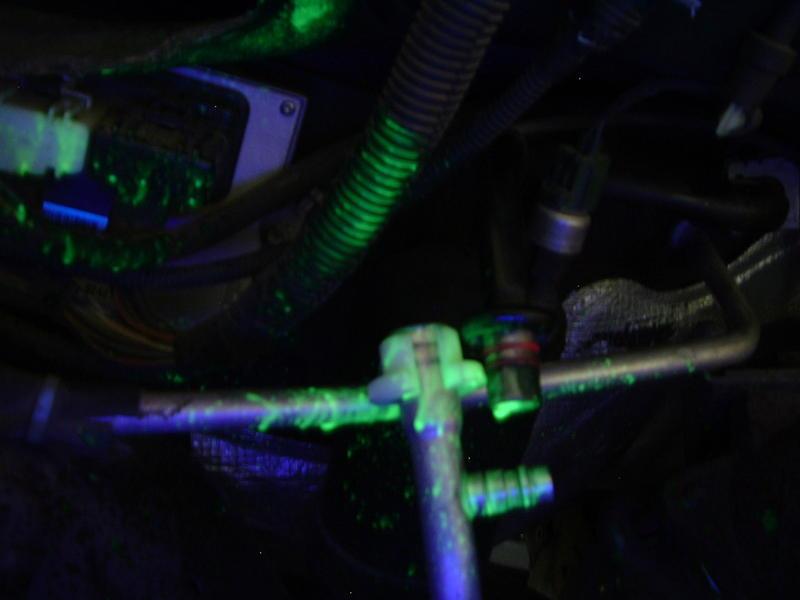
Any old black light works... But I'll tell you a secret... Once the dye is expose to the atomphere in about 6-12 hours the dye fades away so if you going to hunt A/C leak go out and take a drive with the A/C on and come back and check this will circulate the dye around so if the leak is on the high side it will bled for you and be visable for a short period.
-
Well seeing your trying to get a repair done I can lift the limitation for you... POOF! Standard Member...
-
Just get a can of UV dye and use a black light over the piping... If you don.t find any UV dye in the engine bay then its in the HVAC unit under the dash that simple... This when I pulled the pipe apart and there was still a puff of freon left...
-
That's the thing... The high/low pressures will change as weather changes. Like pressures will get lower as the weather get colder. Then the pressures will rise as the weather warms and the under hood temps rise it will push it higher... Tell you the truth... If you do a bit of reading there is a point where less is better. As long as the evaporator is not flood with liquid freon it will get colder. Basically the lower the low side pressure the colder the A/C will get. But the low pressure switch is the limiting factor. This keeps enough pressure in the system so the evaporator can't freeze. So it continually sweats instead. So if you got enough freon to keep the compressor running constant at say 1,500-2,000 RPM's then I wouldn't sweat it... Just chill out... (Yeah I was being punny)
-
Hmmm... You still have a restriction some where... Typical fuel pressure drop on a 150 GPH pump should be only 2-3 PSI tops. Just for food for thought my old Carter stock pump new use to drop 4-5 PSI on stock plumbing. Then switch over to the Vulcan Big like Kit and stock Carter and only had 2-3 PSI drop... Then upgrade to a AirDog 150 now only 1-2 PSI drop. But seeing a 8 PSI drop from Idle to WOT there is something wrong...
-
Johnfak... Remember your exhaust housing is much smaller (9 cm2) than his Common Rail (not sure of the exhaust housing size) so you drive pressure will rise quick on the high end... This is what called the choke point when the DP rises about that 1:1 ratio.
-
OUCH... That just too low... Keep it in the green...
-
About right... If your looking for the pressure tables they are located in the Dodge FSM...
-
Actually it all fits under the hood fine... As for the bolts you can use them to hold your heat shiled in place. Then while mounting the heat shield use backing nuts to hold the plate up a bit more so the top nuts are flush... http://mopar.mopar1973man.com/personal/2002/bhaf/bhaf.htm
-
Russ, I get so damn tongue-tied trying to come up with the right words to say to you... They all seem so inadequate. You're one helluva great guy and it tears me to pieces to see this damn diease putting you out of commission on a daily basis... If the miles were shorter between Idaho and RI you know I'd be there as quick as my Dodge could get me. But I'm stuck! At least ISX stepped up to the plate and offered to do the electronics wiring for ya. I really don't know what else to say...Thats odd... Like ISX pointed out typically its a 1/8" NPT...Bad selector switch in the dash?