
Mopar1973Man
Owner
-
Joined
-
Last visited
Everything posted by Mopar1973Man
-
Sorry gang... I've got to keep this short and say I'm fighting a local fire near my home. It started in the Hazard drainage and now is heading north threatening Elk Lake Road homes. I've got to be back on the fire line at 7am. I'll report more by tomorrow night.
-
There is a surge that is created by a magnetic collapse of the motor winding. Kind of like what killed the LED in my exhaust brake switch. Every time the power was cut to the solenoid of the vacuum valve the voltage spike was so great that the light weight LED burned up. I've been zapped by battery cables or wiring from heavy draws on starters as the magnetic field collapses it creates this surge. http://www.allaboutcircuits.com/textbook/semiconductors/chpt-3/inductor-commutating-circuits/ So because of the light weight hardware in some version of Quadzilla the circuits are damaged from this spike.
-
Don't set any voltage on Timbo's sensors. More or less look for voltage rise then for it to fall back and take 1/2 turn more from the screw. http://articles.mopar1973man.com/2nd-generation-24v-dodge-cummins/26-engine-systems/39-timbos-apps-installing
-
I would get a few tubes of caulk and go for it.
-
Nice pull.
-
Set up correctly?
-
Interesting to say the least.
-
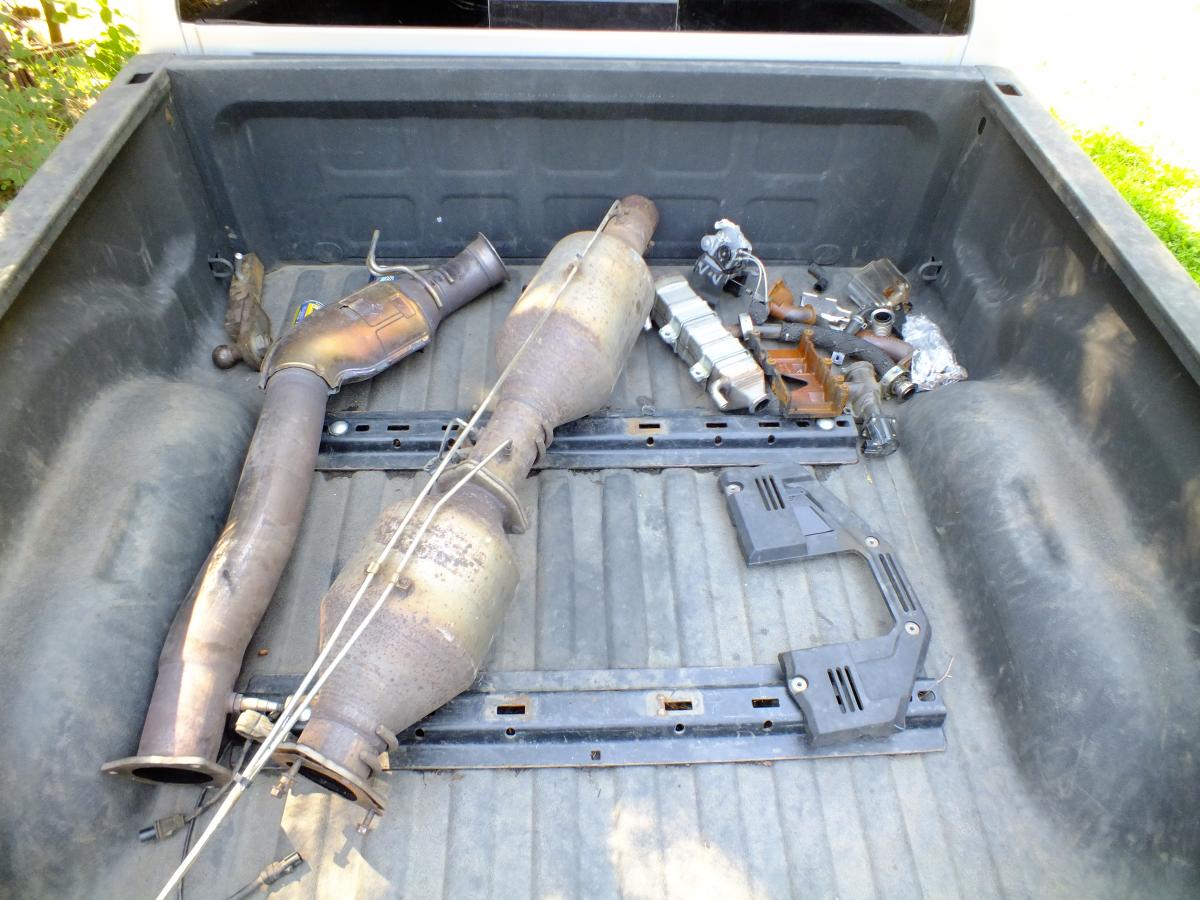
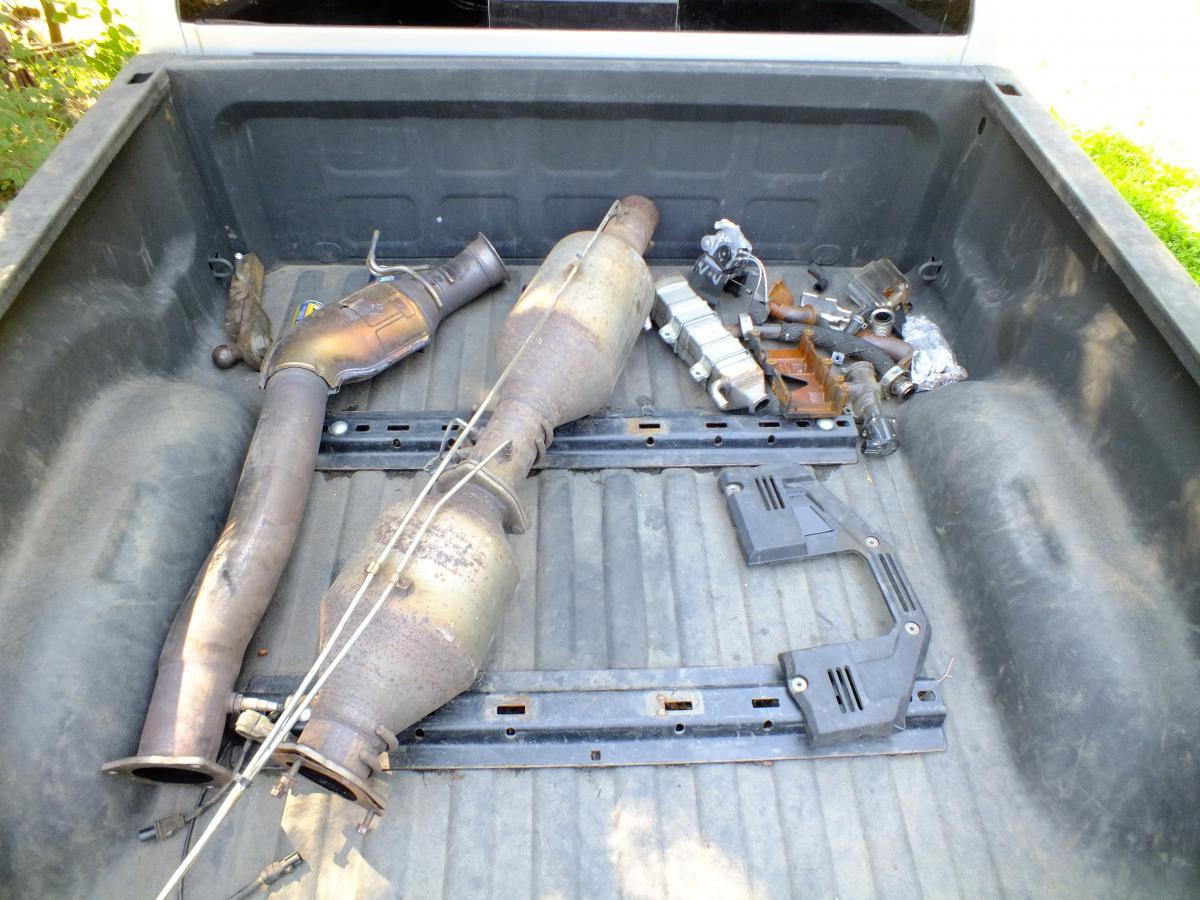
Project Completed. Owner is very satisfied with the delete and tuner. I've got a Starlite Diesel AutoCal (EFI Tuner) Awesome amount of power cranked up on 5 vs down at mild level 1. Truck is absolutely faster, little to no smoke even cranked up. Very clean.
-
Doesn't it figure?!
-
Just replace the plug. That should fix the problem.
-
Might be a good time for both of you get together create an article on how to build one. List sources of parts and prices of parts. Then you might want to upload your code to download area as well as any other programs required. Then makes it a bit more fool proof for others to get involved as well.
-
Amazing how the last half is shorter than the first half.
-
Holy cow I replaced mine after 10 years. You done very well with batteries. Your cables are shot and should be replaced. When you do replace both the batteries and cables use a little bit of engine oil on the terminals and you'll never have to clean your cables ever again.
-
Talking to the Deputy tonight there was over 80 new fires started. Dry lightning tonight on my way home. Praying for rain! As for the RV I went out to check it and it was still dry inside but the roof vents are full of pine needles even though the vents are barely opened. I guess one of these days I grab the vacuum and clean them up. I've already done the roof coating and been doing chalking around lights and seams. So far so good and staying dry inside.
-
Hmmm... I'm right around 30k miles a year.
-
Enuf said...
-
That's one thing I've not done yet is axle seal on the rear. The rear pinion seal was covered under warranty. The front axle seal where done by a shop because tire shop tore the seals changing the unit bearing up front. So I'm due to see them start leaking.
-
There was a few that mention that GV boxes tend to create issues. Something about the extra gear up put extra stress on the input shaft. Give it a try in stock truck it won't happen. Yes, I'm limiting my traction so I'm not breaking the input shaft. But a whole 1.1" inch reduction vs 265's in tire face isn't a huge deal breaker either. Bit of history to toss in... https://en.wikipedia.org/wiki/New_Venture_Gear New Process Gear History In 1888 Thomas W. Meachem founded the New Process Rawhide Company in Baldwinsville New York. In the late 1890s New Process Rawhide moved operations to Syracuse after a fire. In 1913 Thomas W. Meachem reorganized New Process Rawhide with one of his partners Artemus Vosburgh. The company was renamed New Process Gear to reflect the new corporate direction. In 1954, after a succession of owners including Willys-Overland,[4] New Process Gear became a subsidiary of Chrysler Corporation.[5] In 1990, under a new joint GM - Chrylser venture, New Process Gear was renamed "New Process Gear Division" of New Venture Gear. In 1998 Daimler Benz merged with Chrysler to form Daimler Chrysler. In 2002 Daimler Chrysler bought the entire 36% minority stake in New Venture Gear from GM while retaining ownership of the Syracuse New Process facilities. In 2004 Canada based Magna International purchased 80% of New Venture Gear from Daimler Chrysler. In 2007 Magna purchased the remaining 20% interest. The New Process gear plant remained property of Daimler Chrysler. Chrysler then leased the facilities to Magna.[6] This lease arrangement made it difficult to compete with the European manufacturing operation Magna directly purchased located in Roitzsch Germany.[7] A downturn in Jeep demand combined with DaimlerChrysler not replacing the Dodge Neon sharply curtailed demand for the Syracuse New Process Gear plant production. In 2009 design and engineering services were moved to Troy Michigan and Magna International announced its intent to close the Syracuse plant. The Syracuse New Process Gear plant planned closure in November 2011 was pushed out till 1st quarter of 2012.[8] After 124 years on Thursday August 24, 2012 New Process Gear ended production and closed their doors for the last time.[9]
-
Should of been here last night it pour rain and the lightning show was rather good. I'm glad to report the fire radio didn't go off last night and I don't see smoke in the air. I might have to take a walk down to the RV and check inside it being I do have the roof vent cracked open and 2 windows.
-
Just a seal as far as I know. When you take the hub off the seal is on the back of the hub. No other gaskets you would need. You might need new nuts for the axles I've seen some were like nyloc's and no longer hold properly after being removed.
-
Yeah maybe... Sloppy job. Pull the pitman arm off. Then remove the sector adjustment cover. Now push the output shaft back up through the top. Remove any clip holding the outer seals. The using a drift or punch knock both seals there should be a outer dust seal and a inner hydraulic seal. Assembly will be reversed. The bad part is you need to work from the top of the box. I know from my truck the veiw and access is rather limited so you might have to remove the box just to do the seal. If you that far it really easy to rebuild and re-seal.
-
NV4500 are cheaper and available being they where used in more than just Dodge trucks. Yes they are pretty darn strong. When I can get the tires to break loose in 4th. No 5th gear issues or input shaft issues. The only difference is down low gears. They added the between 2nd and 3rd gear on the 5 speed. Because the last two gears in both transmissions are exactly the same. 3rd gear is a rather a long reach to get to 4th when towing stock. But I'm no where near stock nor do I have that issues any longer. Stock power you will need the extra gear for steep mountain forestry roads and towing.
-
Hmmm... I wonder how long till mine give up??? Already 15 years old and unknown if they been replaced.
-
You left the vent open and the wind ripped them off. Not good...
-
Buy a Timbo's APPS and save your money. The stock APPS is electronic driven where the Timbo's is completely mechanical.