
Mopar1973Man
Owner
-
Joined
-
Last visited
Everything posted by Mopar1973Man
-
I wasn't figuring that was torque converter lockup per say. Maybe the AC noise is disturbing a sensor for the engine function and creating the shutter issue? Now re-reading the post again and thinking possibly is the clutch in the torque converter getting tired and slipping only in 4th gear while towing?
-
The only defuel setting I use is the EGT. The boost I don't use at all. Warm up mode I set for 165*F. High idle I don't use either. Take your finger drag the screen to the left or right.
-
The only way I can capture logs safely is to recreate the same results in a non-highway road where I can stop and capture the data. I can do screenshots of the Quadzilla easy because I've got it rigged on the phone for screen capture and it saves directly to the phone. As for data logging being the 5 minute limit and the menu function it too dangerous to do at highway speeds. I've already sent an email to Quadzilla about the previous ideas but no idea if it's in a list, considered, or even read? Attempted another run to capture in flight. Ended up dropping the phone and focusing on driving because there is no where to safely pull off the road to capture soon enough not to miss the 5 minute window. It would be a little different if I lived in a city where I could take a back road and play on. Here the only road is the highway all other roads are city streets (15-25 MPH typical speed limit).
-
As you see it there hovering at about 5% to 10%. There is several canyon stretches where there is just enough downgrade. Speed isn't the issue, the engine load and timing. I'm capture reproducing at just about any speed as long as I can get the engine load low. I've watched this flip flop happen many times on shallow downhill runs with light throttle. More or less throttle was held at 10% through most of this. Again I'd capture on the road in real conditions just too dangerous to attempt driving a winding canyon road, that is icy and slick and messing with a cellphone with a bad menu icon and tempting to capture data quickly before 5 minutes runs out. Till this is resolved I really can't data log some of the weird things I see. If the app had a capture button pre-configured for your export I would just reach down and tap it when then thing occur.
-
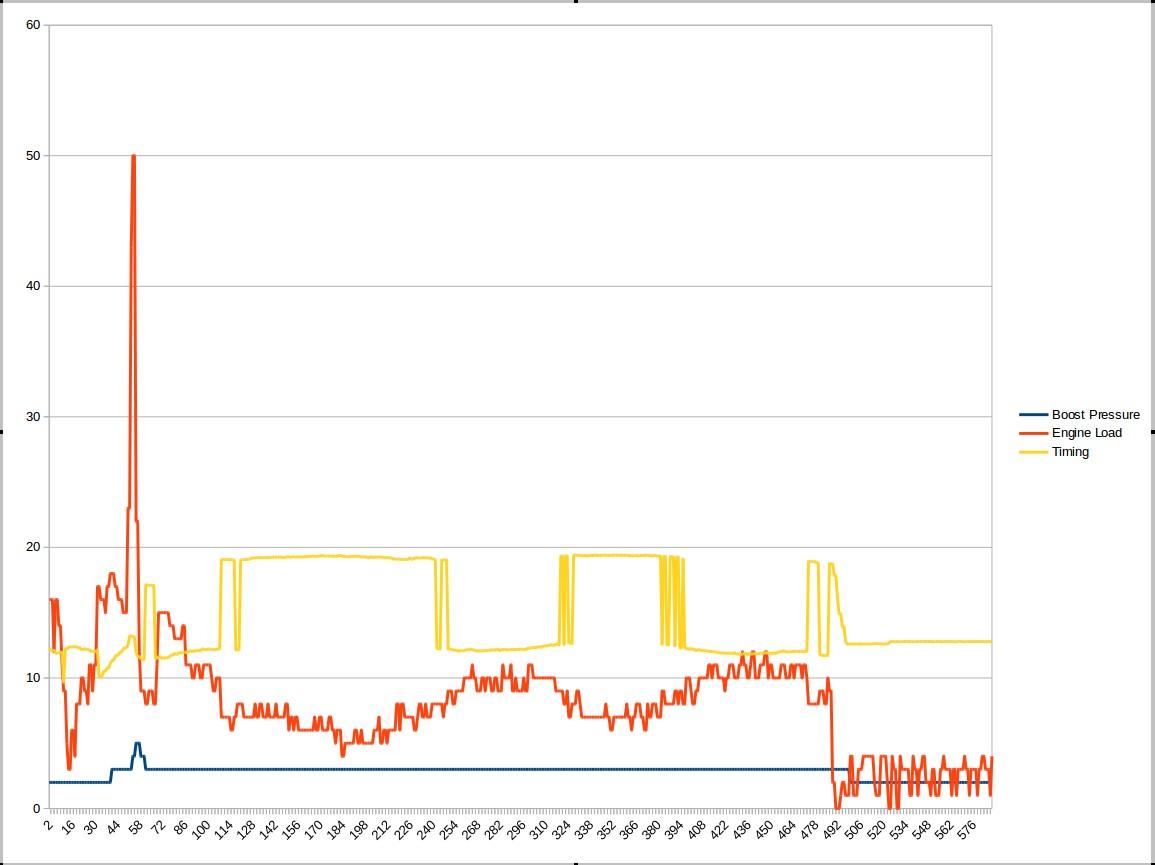
Here is a captured log I had to find a spot to get it to happen while I had a chance to stop and access the log features. VERY DANGEROUS to attempt at highway speeds. Way too many screens and looking down to capture. Now if you look I'm at low engine load it should be staying hi in the timing but drops several times. Low boost as you can see.
-
Well if you want data logs you going to have to correct that menu button so I can reach the menu on the fly being I can't just stop on a interstate to do logging nor can I stop in the middle of a two lane road to do logging. I'm still travelling roads with no pullouts so till that menu button is fixed I can't do much being that I might have to drive 15-30 minutes away to a pull out or off ramp by then the little tiny 5 minute log is long gone that I wanted. Till then you'll have to consider what I'm say... I have no other choice... They still look like this right now. Just better weather, high berms. Other than that I give you lots of deceleration logs to pullouts which are meaningless... I was thinking of the controlling of timing during cruise state. Not cancel per say. As load goes up the timing should be retarding to allow the engine to build boost. So cruise is set say 65 MPH hit a small hill load rises timing should fall. Right now the timing either holds or possibly advances.
-
Boost elbows tend to have a bleed hole in them. Normally we test using a regulated air pressure and leave it hooked up and spray soapy water around all the fittings, intercooler, MAP and IAT sensors looking for leaks, don't forget the intake cover plate and grid heaters too.
-
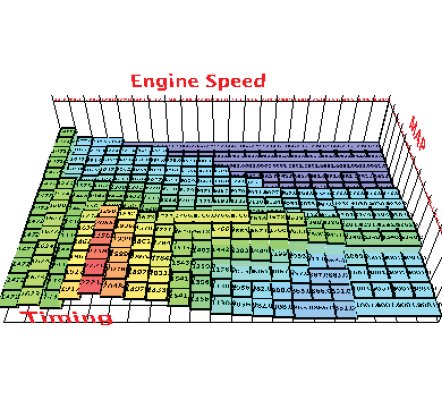
I know @Me78569 you mentioned something about that odd flip-flopping of timing at low loads. I figured it out you're pulling the timing too far retarded and the ECM is fighting to advance the timing. I watch a normal timing on Level ZERO for awhile at low load the timing is supposed to advance and under heavy engine loads, the timing is supposed to retard. Which some of the programmings is backward like "Fuel load Timing" that is backward too. With the high engine load should give the least amount of timing advancement aiding spooling and then as load reduces then the timing start advancing again. The cruise timing has the same weird bug too where the flip-flop starts because the Quadzilla will pull down to 11-13* and then the ECM is pushing for 19-21 at loads below 15% and then the flip-flop starts. Go to level 0 and the ECM does like its suppose to kick the timing high at low loads and loads increase the timing retards. I know this a bit old of a pic but gave some clues to what is wrong... Just think of changing the MAP axis to Engine Load. Because boost and engine load tend to follow each other to a certain amount except cruise where boost could be much higher because of engine RPMs. Like for example, I can have 10-12 PSI of boost and 0-10% engine load. Your current design is based on boost which is kicking out the cruise state or holding too long at lower speeds. Where in my example the engine load would keep it in cruise state but now set a limit load wise it would kick out like its suppose too. This why the cruise state should be controlled more by engine load and not boost.
-
The splitter cord supplied is hi beam on the smaller inner reflector which produces a weird pattern of light that is narrow as well. The lo beam is awesome its on the main reflector and does spread the light great. I'm just half tempted to just pull the splitter cables off for now and just use the main reflector side till I build the relay kit. Here is the OEM setup and not hard to do.
-
This is what is tracking my fuel log data and my mini-dyno. http://www.obdlink.com/lxbt/
-
Comes with a full manual for installing the Quadzilla Adrenaline. All the connections are under the hood except for one power wire that goes in the cab. No OBDII connection required for the Quadzilla Adrenaline. I've got my OBDLink in the OBDII port now. I'm going to tweak my tune some more and keep updating my MPG thread as I do. I've also found a few more bugs for @Me78569 to look at and possibly fix. As for tuning once you get it all hooked up we can all work together to help you get what your looking for.
-
Wow...
-
AC noise from the alternator? Have you tested for it? That range could be a AC noise issue as well.
-
I'll take it if you can email it to me...
-
Typically I hold my foot down on the throttle after changing a filter. Then crank the starter. Yeah it going to rev rather hard but you'll pull the air through the system. I'm not saying red line but we'll in the 2k bracket.
-
That's one weird squirrel.
-
Mine aren't pinned wrong it that it's split so only one bulb per side is functional. I need to buy 4 headlight plugs and a few relays to make each side work with 2 bulbs.
-
Totally agree. Better the efficiency the better the emissions will be. So all these devices like EGR, DPF, etc. All add fuel consumption. The problem is the big Govt wants inefficient vehicles that way they can make more tax dollars on fuel sales. This is why true hybrid vehicles are illegal to be sold in the USA.
-
So... If the Dodge is coming to me are you going to have the parts all piled in the bed for me to install? Or are you going to hand me a blank check or credit card? Some of that is easy to do but like he Auto to manual might be a bit more involved.
-
He need another picture from the rear of the truck showing off the stacks. Very clean and nice looking truck.
-
I think the leak was pooled fuel in the outside of the tube that was expanding out. This is way the tape made it stop weeping. If he drove it for few days and then power washed it I bet it would of been stopped any ways. If you got 4,000 to 20,000 PSI i hardly doubt a little Teflon tape is going to keep that pressure from leaking. This why I say it was just pooled fuel and it was just expanding out.
-
Not the issue. I've got 2 bulbs in each headlight but only one bulb at a time is lit. Always bright but the hi beam side is a narrow reflector so the beam path is narrow as well.
-
Like I said it might be easier to just doze the house and start over. So far no one has found a solution that doesn't cost a fortune.
-
If there was a way I could get to the menu easy on my phone I'd be happy to help out with logging data. Since the icon is so tiny and hard to get the menu open it not safe for me to even try in all my travels. It not safe for me even try getting menu open and exporting a data log. I sure wish this problem was fixed.
-
I'll have to get photos of the house up close for you all. There is no way to jack up this buildng.