
Mopar1973Man
Owner
-
Joined
-
Last visited
Everything posted by Mopar1973Man
-
Wear a mask while driving then the ticket can be tossed out. You can't be identified. This has been proven. https://safishing.com/product-category/face-shield/
-
@Me78569 Hey... I would see if you could get the fuel level display as a gauge too. Being you can see the speed from the ABS I'm pretty sure you could see fuel level from the PCM as well.
-
If I'm not mistaken they are out of Canada...
-
Don't buy Moog... It's not a quality product any longer.
-
That's because Moog is no longer made in the USA and is in "Junk Category" for parts. NAPA and other brand are still good.
-
http://www.obdlink.com/
-
Steering box brace is only needed for oversized tire users more so. If you are running stock tires not really required but could prove helpful. Like my truck I've never used a steering box brace and my gearbox now after 16 years and 316k miles is now started to weep. I'm running stock size tires. (235/85 R16)
-
Any of these tools can only see the available data on the OBDII port. So no matter what tool you use the same data will be available. So the sensor that the ECM reports on the ODBII port is IAT Sensor (Intake Air Temperature) ECT Sensor (Engine Coolant Temperature) MAP Sensor (Boost pressure - Typically misreported) Engine Load RPM MPH (Actually from the ABS computer) GPH Gallons Per Hour (This is calculated) No Fuel pressure does not report because there is no sensor on the ECM for fuel pressure. Now on 04.5 and up Dodge Ram's the Fuel rail pressure does report. Absolutely true. Much easier to use and many different apps that do all kinds of different things. Like I've used OBDLink App and kind of like it but missing auto-connect feature. Dash Command is a good app and shows much more data than ObDLink and the ScanGauge II can plus capable of data logging. Dash Command https://play.google.com/store/apps/details?id=com.palmerperformance.DashCommand&hl=en OBDLink https://play.google.com/store/apps/details?id=OCTech.Mobile.Applications.OBDLink&hl=en Torque Pro https://play.google.com/store/apps/details?id=org.prowl.torque&hl=en
-
I was starting at 105% and working my way up using about a 2.5% growth rate.
-
I'm one of the rare ones. Still got factory OEM tie rods yet and they are still tight. Only replaced one set of ball joints and one track bar. 316k miles and still going... In another thread I'm going to get ready to do a steering box reseal soon. Other than that its still tight like factory.
-
Companion module is the ECM. This problem is based mostly on the CCD network.
-
Need to hop over the OBDII error code list in the articles section and read up on the codes. Give me a chance to get home ill dig up more information for you. Most likely in the morning.
-
Avoid Moog and the Dodge Dealer... Both bad ideas. NAPA is good.
-
Look again... There isn't just ends you end up replacing all of it.
-
Yes stock parts will be fine. As long you don't put oversized tires or lift kit on the truck.
-
Now for those of you looking to get your "Daily Tune" smoke-free as possible. So I'll say @Me78569 is right you want to set the Quadzilla to level 1 and use the valet mode to find your start fuel percentage. So keep rolling back till you can no longer see smoke from a heavy throttle launch. So once you got that figured out now you need to build a good fueling curve. Now change the Quadzilla to level 3. What I use for building curves is an exponential growth calculator. http://www.rapidtables.com/calc/math/exponential-growth-calculator.htm Enter initial value (x0): Use your value from level 0. Enter growth/decay rate (r): Use your growth rate percentage 1-4% typically. Enter time (t): Enter Boost Pressure number here. Now you want to start with your starting fuel number you got from level 0 and then use that as your starting number. I suggest a growth rate of about 2-3% typically. If you use too much growth percentage you see the smoke come on mid boost so this is a sign to back down your growth percentage. I'm not saying a full -1% but maybe try like -0.1% or -0.2%.
-
Good you can have that Idaho Piss Fir... That smells like a dog pissed all over it. There is always tons of white fir around and no one wants it for firewood and typically get burned in slash piles.
-
Doing 55 MPH is going to be a lower load value typically. Doing 75 MPH is going to a high load value. Still in all you need a measurement at cruising state on flat ground. I don't suggest attempting to get cruise timing for anything more than 75 MPH. Like out here with 80 MPH interstate travel I don't know if I want to stack on cruise timing to nearly 2,500 RPM timing values. 65 MPH fairly common value and reasonable spot to work at. That is why I suggested it.
-
I found a perfect way of setting this properly for your truck and Quadzilla tunes. This is the maximum engine load allow before Quadzilla Adrenaline kick out of the cruise timing map and switches back to the performance map. All you got to do is set your cruise for 65 MPH at highway speeds and monitor your engine load amount on the display. Like my truck is about 25% engine load at 65 MPH. Now set the Load Limit setting for maybe +5% higher. When you're traveling in rolling country it should hold on to the cruise timing just enough that small changes will not kick the cruise timing out but a fair grade will kick cruise timing out and switch you back to performance timing. Soon as the grade is over it should flip back fairly quickly. Excessively low setting will make it rather tough to ever get to cruise timing and degrade MPG performance. Excessively high setting will degrade pulling power on the grades.
-
Best bet is to look towards the Quadzilla Adrenaline. It will allow for your large injectors and be able to tune it to be smoke-free for the most part. Allow for custom timing curves for all your needs from daily driving, towing of all-out dyno runs. https://mopar1973man.com/forum/174-quadzilla-power/
-
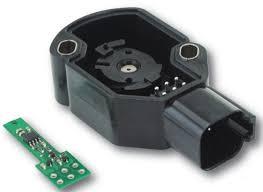
Here is a stock APPS... Now a Wells Apps... Still seeing logic chips electronic parts... Then flop over to Timbos... Then there is the IVS contacts... No electronics for the IVS like Stock or Wells sensors use. The only thing Wells Sensors did was get rid of the rheostat and add a magnet and magnetic pickup for the position of the magnet. Still all electronic based to get the TPS signal and IVS signals.
-
Wait till you sober up and go next door to the "School of hard knocks"... It'll hurt even more...
-
It wrong period... If I was harassed by a Ford owner doesn't give me rights to stuff potatoes up his tail pipe. Wrong is wrong... There is no unless or exceptions... (Here comes the potato jokes for the Idaho boy... )
-
Can I get a room with you guys??? I'll bring the Whiskey...
-
You'll need a mirror to see in the hole for sure. Nope... That comes from the old school speedometer setup idea. Everything with RWAL or 4W ABS all get their speed signal from the ABS computer. Even my 1996 Dodge 1500 still the same thing speed sensor is in the rear diff housing top. Funny the weird things that break without speed signal. Grid heaters don't shut off during road travel. Cruise Control doesn't function High idle will not cancel for movement. Speedometer / odometer function VP44 idle function doesn't step down like typical at stops. Trip computer doesn't work. ABS failure (light tripped).