
Mopar1973Man
Owner
-
Joined
-
Last visited
Everything posted by Mopar1973Man
-
Naw... Not as good as my 100w watt bulbs on the axle. I will upgrade them but I'm going to add floodlights in LED to the axle. Much better than the stock back up lights that doesn't work really.
-
@JAG1 where does this bolt go? Clank....
-
After 24 hours of being home, I feel so much better. I've gotten rest and a bit more time to heal. Pain level is nice and low yet. I've got an appointment to have the tube removed from my back on Wednesday then I'll be able to wear my blue jeans again and walk normal again. More or less my biggest thing is keeping hydrated and keep flushing my kidneys and bladder good so no infection starts. Even though most are shocked at the amount of driving I do for MoparMom just getting up this morning and expecting that was relaxing in its self getting back to the normal routine.
-
Very good explanation...
-
Same here. Mine are currently disconnected. Powerwise at the battery. But if you disconnect the grid heater solenoid leads yes it will throw a code.
-
Same here. Timing advancement of the Edge Comp?
-
FSM covers the VIN code and body codes and nothing listed for California I could tell.
-
Sorry gang... My local branch of my bank now is 125 miles away. I've got two check sitting here and got to remember to take them with me. Paypal is much much easier to handle and I don't have to drive anywhere to process paper.
-
Entire cluster. I'm not sure how much of you can condense. It's the fact when things go missing in this CCD network weird things happen. I'm not sure how much you can remove without the CCD shutting down and quits functioning.
-
Agreed the 1/2 inch has to start at the fuel tank and finish at the VP44 while keeping the stock fuel filter can.
-
7 x 0.010 might overwhelm the AirDog 100. Being you get 6 PSI drop on stock injectors. The drop will just get worse with a 7 x 0.010 injectors. As for the 7 x 0.010 will end up being too smokey on a Smarty S-03 since you can't control the timing properly. Yeah, I know got setting for Mild to Wild on timing. Still doesn't allow you to adjust the way you need. Now the Quadzilla you have that control of the timing and set up fairly easy. Now with bumping the pop pressure up, I'm finding that you got to retard slightly Because the flow rate is down but the atomization is up and ignites easier.
-
Yep... Gotta be with family first. More important that Cummins. Get your mind right first and the rest will fall in place, my friend.
-
I would rather reverse that around. Stay with stock hydros then use a block on top of the pedal to push the pedal to the floor. This way no worry about over adjustment. The blocked pedal still gets the pedal to the floor as needed. It could be done pretty trick by removing the rubber pedal pad and the having a slip on frame block that locks with two bolts by tension. Yeah I can see it in my mind just can't explain it well.
-
Don't use adjustable hydros. Very common for people to adjust them poorly then hyperextend the throwout bearing through the pressure plate fingers causing damage. You best off leaving the stock hydro installed but just freshen them up. I've talked to South Bend about this and the hyperextending the throwout bearing more common than you think. Typically because people buy the adjustable hydro to attempt to change where the pedal engages the clutch at. These are typically the people the end up hyperextending the throwout.
-
Oh my, it nice to be home. (Whew!) Finally got back to Brian's house yesterday and packed our stuff up and rolled on to get Mom from the dialysis center. I was still hurting for sure but tolerating it knowing the end goal was going to be much better. Amazing evening. I got home and struggled to get everything hauled upstairs. Started doing the normal thing of relaxing in front of the computer and taking care of the website. Happen to spot @IBMobile wife Jennifer on Facebook and for whatever reason, I called her last night. It turned into an extremely long conversation that covered herbal medicines, spiritual life and just life in general. During this conversation, it makes me so grateful for my extended internet family I've created here on the M73M website. I really do appreciate everything everyone is doing to help me through these times with my cancer issues. You all have provided me the strength to keep going through some scary times. I thank all you for just being there for me.
-
Little extreme. Looks stellar for getting it all on a terminal strip. Could have just stripped all the wires, stuffed a single ring terminal and soldered the ring terminal to the wires. Then bolted back directly to the fender. The insulated terminal strip has a bad side is that now all these independent connections has full exposure to water and oxidation. It will work but comes at a price that more exposed metal to water and air will oxidize faster. This is why the factory had it all jammed in a ring terminal soldered. Less, exposed area to the elements.
-
As for the fuel pressure sensor. My sensors is a good distance from the tap point, snubber back at the tap point. As my boost and fuel pressure are mounted on the fender forward of the ABS module. This is an ABSOLUTE NO-NO... Even if there was a snubber before it still a NO-NO. NEVER install the sensor at the VP44. The pulses are still extremely strong and ruin the fuel pressure sensors. There must be at LEAST 5 foot of tubing from the tap point and snubber to the sensor.
-
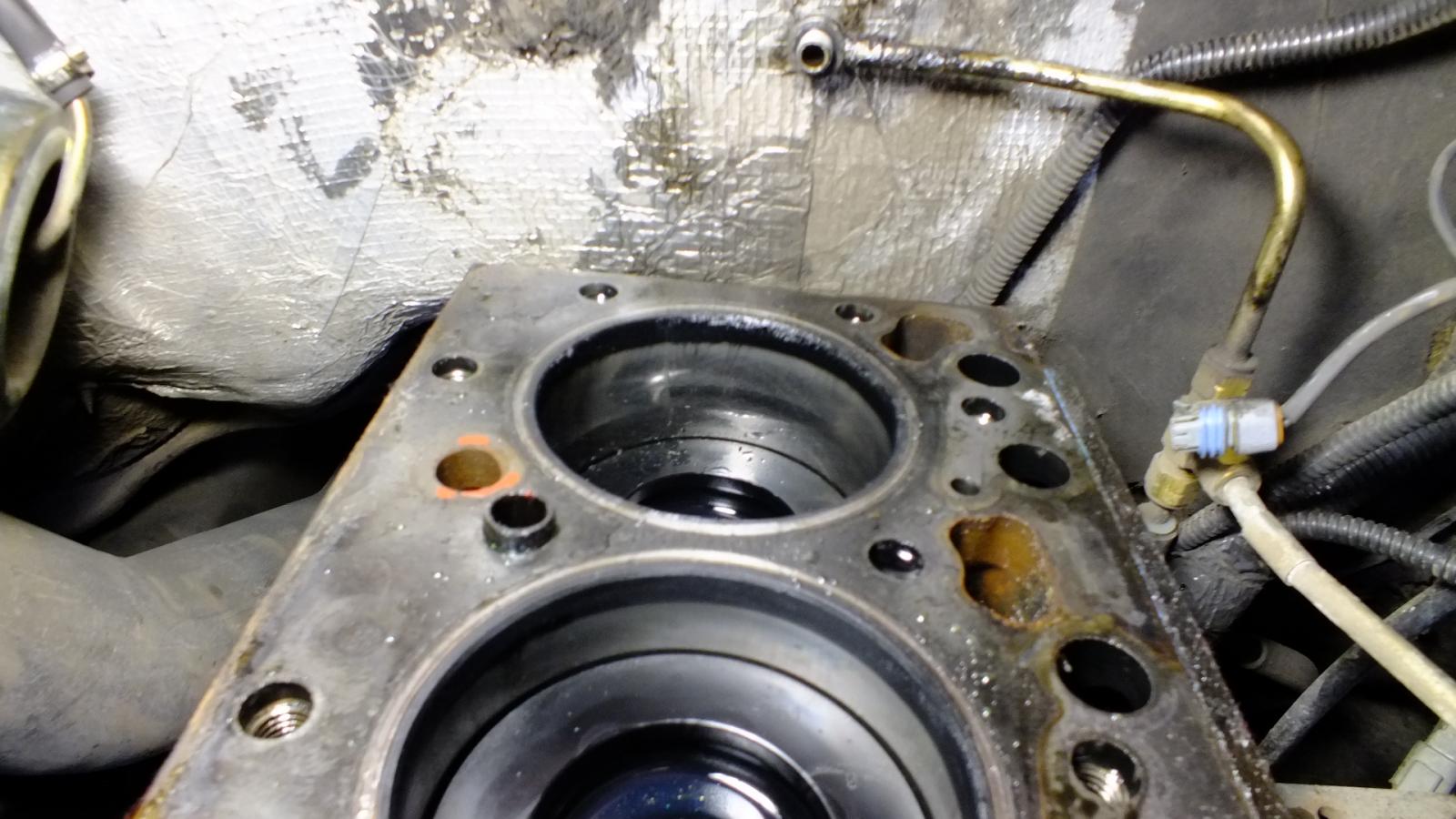
Mine was a bit different no real rust but it was dark/blackish looking. Unmolested picture after the head was removed.
-
Then a guy like me with my stock looking truck comes along and steals your chick because I just whipped you in street race with 245's tires. Seriously, I've surprised a lot of people with my truck, the perfect street sleeper. I got it to admit it was nice to hop back in the saddle yesterday got to the I-84 kick the pig and roasted the tires in 3rd, hit 4th hopping, nailed 5th and was hitting over 80 MPH before the end of the on-ramp after being in the hospital for 3 days. There was a post back aways back... Well, yeah everyone thinks it looks cool. I do as well it does look pretty darn good. There are forces of leverage that cause huge issues with the front axles with larger tires and wheel offsets. The final gear ratio gets altered without any considerations. This why people like DOR exist is to get the parts upgrades to hold larger tires without damage. Then the gear ratio issue most dismiss but end up eating transmissions and drivelines because of the torque trapping you do with final gear ratios below 3.55. Optimal is 3.55 to 3.73 to the ground. Most add tires and end up in the 3.00 to 3.20 realm which is too low.
-
Ok, being I support Smarty as well I've got to be honest and show the numbers. Now Smarty Touch and the Smart S-03 for the 24v are still only a +60HP tuner. The only Smarty tuner that can meet Quadzilla at tuneability is the Smarty Touch (or Smarty MM3) but the price on the Touch or MM3 is $1,724.00 for the complete kit getting Touch, Pyrometer probe, Dongle to unlock the software (UDC Pro software), ComMod to allow on the fly adjustments (like the Quadzilla). Now compare to Quadzilla at $675.00 it's a +180HP tuner and that covers everything you need. Pyrometer comes with the kit where Smarty Pyro is an extra cost. Custom made DAP injectors. DAP 7x0.010 injector nozzles on my stock OEM bodies. I requested 320 bar for pop pressure typically the 7 x0.010 are set for 305 bar. Keep in mind the bottom limit is 293 bar and the injector pop pressure is TOO LOW. Yeah, it does allow more fuel flow but the automation efficiency is lost. Then longevity is lost too because the injector will settle out about 10 bar in the first 10k to 20m miles. The extra pressure give more mileage to the longevity and efficiency like my 7 x 0.0085 injectors @ 305 bar didn't even make a full 100k miles around 70k miles and the MPG fell off. Keep in mind stock pop pressure is 310 bar.
-
Ok. I noticed something in this picture. Just looking at the coolant port forward right that looks to be coolant failure of the gasket. Coolant wasn't flushed often enough. I want you to pay close attention to that front corner. Part of the failure is coolant and the other one the typical head curl. Over time the heating and cooling cycles creates head curl stretching the stock head bolts on the ends of the head. The visible rust in that corner is oxidation either by the coolant getting too old and pH dropped or the coolant was mixed too water heavy.
-
7 x 0.010 @320 bar works good so far. Still needs more beta test with others. This is not absolute bet yet. For me no issues to report.
-
Quadzilla much better tuner over a Smarty better timing control and fuel management. As injectors get larger more timing us needed. Just the Quadzilla, boost elbow, and stock injectors will be darn close to 300 realm. Based on tires and wheels. Larger tire trap power hence why I went to 30 inch tires. 150 GPH pump is needed for big power fuel pressure stability.
-
Everyone here has been wonderful. Very helpful and nice. I've been given the green light to go home. Catheter was removed this morning.
-
Don't install the K&N. Get BHAF. Optimal IAT temp is 90F to 140F. Cold air will degrade MPG below 80F. Quadzilla will get you the ballpark pretty quick. I'm in the 500 HP range now. (7 x 0.010 @ 320 bar).